The core idea of a manual penetration test is simple: it gives compliance auditors and enterprise customers solid evidence that your application was tested properly, by professionals. This article explains what manual penetration testing is and how it works, how an automated scanner supports the human tester, the methodology behind the test, and why auditors and enterprise customers expect a human-led test rather than a scanner report.
Quick Answers
What is manual penetration testing, and how is it different from a scan?
A person, not software. Someone who knows what they’re doing goes after your app the way a real attacker would, working from an established methodology like OWASP or NIST. A vulnerability scan only checks your app against a list of known problems and prints the matches, which is a useful start but just a start. The manual tester takes it further: sorting the real risks from the noise, finding the weaknesses no scanner checks for, proving what can actually be exploited, and explaining the damage an attacker could do.
Do automated scanners replace manual penetration testing?
No. In practice, scanners get pointed at the target early on, because they map everything and flag the likely weak points in minutes, work that would take a person days. But the findings that actually hurt usually need human judgment, which the tester brings. A person does all of that. The tool handles the groundwork first.
Why do auditors and enterprise customers ask for it?
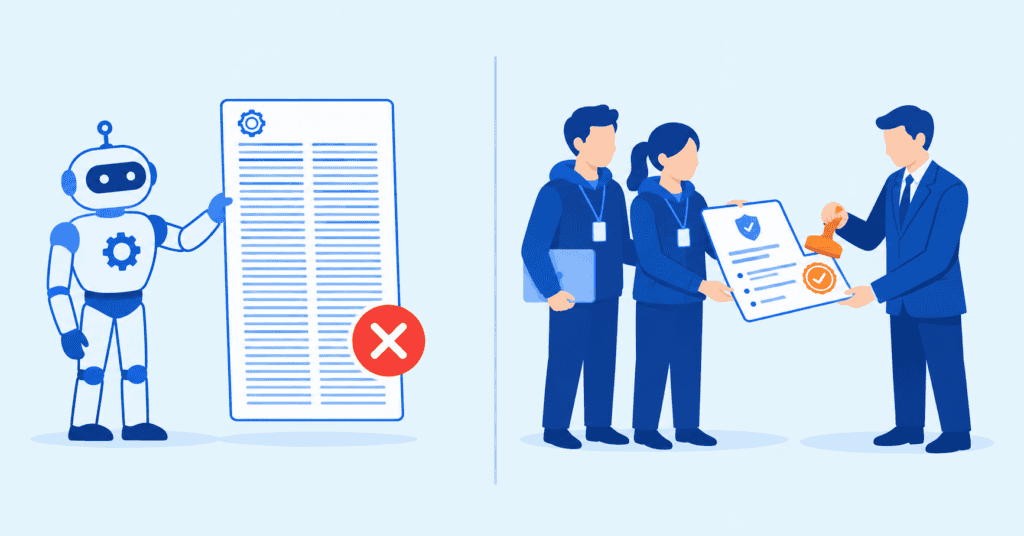
Because the people reviewing your security expect it. SOC 2, PCI DSS, ISO 27001, enterprise security reviews, they all want the same thing: a signed report from an independent, qualified tester who followed a documented methodology. A scanner export is none of that. Submit one on its own and it usually gets sent back with a request for a proper penetration test.
Manual Penetration Testing in Practice
A manual test is an investigation that adapts as it goes. The tester learns how your application behaves, then starts probing the places logic tends to break: a half-finished workflow, a request sent out of order, a permission that quietly does more than it should. One odd response leads to the next question, and the tester follows that thread wherever it goes.
Nothing lands in the final report on a hunch. Every finding was reached by a person, reproduced by hand, and weighed for what it would cost the business, so what you get back is a short list of confirmed, prioritized problems.
Why Auditors and Enterprise Customers Ask for Manual Testing
Often enough, a pentest only happens because something’s forcing the issue. An audit deadline. A huge customer’s security review. An insurance renewal nobody wants to fail. Whoever sits on the far side of that gate has read enough reports to tell the difference between a human-led test and a scanner report at a glance, and that read decides what gets waved through.
Auditors want to see a human did the work. A SOC 2, ISO 27001, or PCI DSS reviewer is looking for a named tester on the report, a methodology they recognize, and some evidence each finding was confirmed by hand instead of guessed at by a tool. Worth being accurate, though: SOC 2 and ISO 27001 don’t flat-out require a pentest. Their reviewers treat an independent, human-led one as the clearest proof your controls hold up. PCI DSS is more explicit, and requires a pentest at least once a year on top of the quarterly scans. (If you want to see how this reads inside an audit, CYBRI has written it up for pentesting as SOC 2 evidence and what an audit-ready report contains.)
Enterprise buyers run the exact same check from the other direction. Their security questionnaires routinely ask for third-party pentest results, and a procurement reviewer spots a scan report in place of a real pentest right away. The deal stalls, and someone has to go back and ask for the proper pentest.
Insurers have drifted into the same habit. A growing number want recent, human-led testing on file before they’ll write a cyber policy or renew one.
Three different audiences, one answer. As soon as a test has to convince someone outside your company, the manual report is what counts, because it’s the kind of evidence they trust.
How Scanners and Manual Testing Work Together
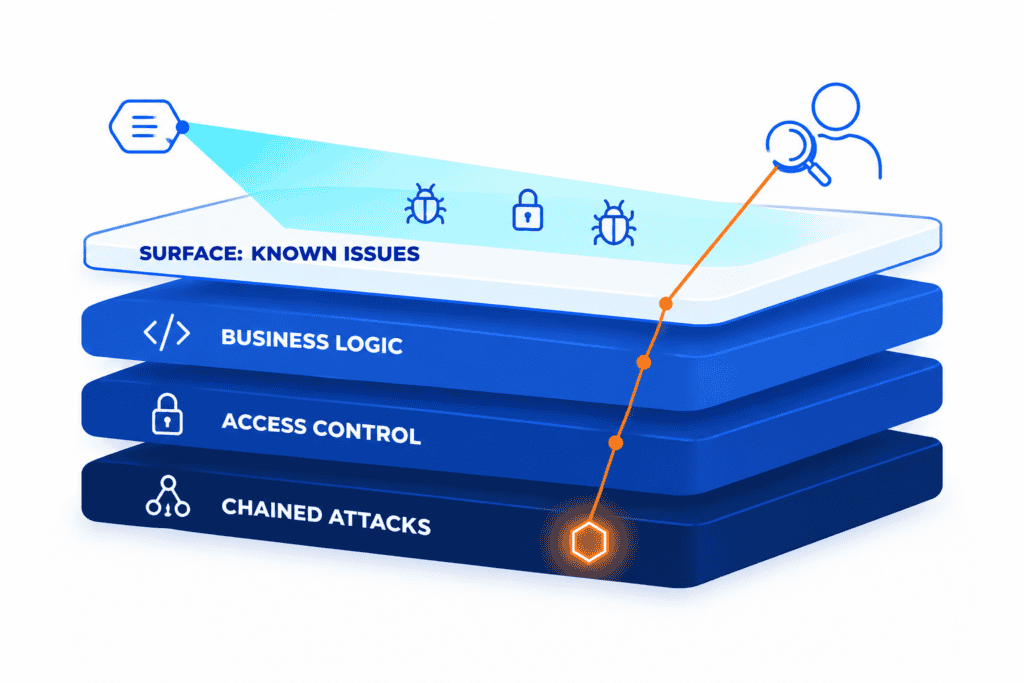
The scanner deserves credit. It’s fast, it never gets tired, it costs almost nothing to run again, and it covers more ground in an hour than a person could in a day. Early in a test it sweeps the whole attack surface, crawls every page and input and endpoint it can find, and checks all of it against enormous databases of known bugs and misconfigurations. What lands on the tester’s desk is a fast, wide map of where the soft spots probably are. Call it the battleground map. It shows you where to point.
Then a human takes over. The scanner’s handed across a list of maybes, and the tester grinds through it: chasing each finding, proving or killing it, and clearing out the false positives before they ever reach your developers’ queue. The tool points. The person digs.
And the digging is where the dangerous stuff lives, because it’s exactly what a tool can’t think its way through. A scanner has no idea what your business rules are, so it’ll happily miss a checkout that lets a customer edit the price mid-request or run the same discount code a hundred times. It doesn’t know who’s supposed to have access to what, so broken access control (one user quietly reading another’s records) slides right past. And it rates every issue on its own, so it never notices three low-severity findings lining up into a full account takeover. Every one of those needs a human sizing up how your particular app is meant to behave. Which is also the reason a raw scanner export isn’t the thing you’re paying for. The value is the verified, ranked findings the tester hands back at the end.
The Process: How a Manual Pentest Runs
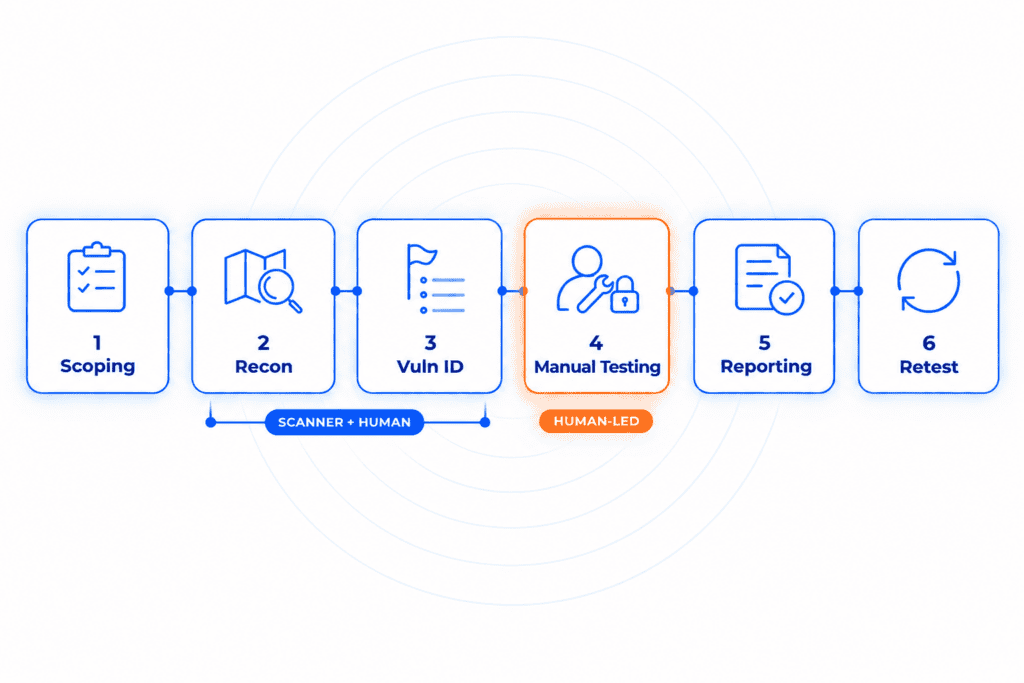
Nearly every engagement runs the same rough shape, borrowed from the NIST SP 800-115 guide: plan, discover, attack, report. From the client’s seat, the stages break down like this.
- Scoping and planning. Nothing gets touched until both sides agree on the boundaries, which apps, APIs, and environments are in play, how much access the tester gets, and what’s off-limits. Access comes in three broad shapes. Black box means starting cold, no inside knowledge, exactly like a stranger on the internet. Grey box hands over a foothold, usually a normal user login. White box opens everything, source code included. The more access the tester has, the deeper the testing goes, which is why white box gives you the most thorough coverage.
- Reconnaissance and mapping. The tester lays out the whole attack surface, domains, pages, inputs, roles and connected services. This is the scanner’s time to shine, crawling the app and cataloguing anything worth a second look so nothing on the surface gets skipped.
- Vulnerability identification. Tool and tester both start marking candidates, from known software bugs to anything that looks suspicious. This is the spotting phase. Out the other end comes the shortlist the tester works by hand.
- Manual testing and exploitation. This step is where most of the real work happens. The tester digs into each candidate, tests the business logic and the access rules that most tools can’t make sense of, and tries to exploit the findings and link them together the way an attacker would. If something genuinely serious turns up, it goes to you that day rather than waiting for the final write-up.
- Reporting. Each confirmed finding gets documented, the proof behind it, the business impact, a CVSS score (Common Vulnerability Scoring System, the standard measure of how serious a flaw is), and step-by-step fixes. Findings are linked to whichever framework you answer to, which lets a single report double as audit evidence.
- Remediation support and retest. Once the report is delivered, the remediation window opens, roughly 90 days. You fix the issues during that time, with the tester reachable for questions along the way. At the end, a retest confirms the fixes held, and the report is updated to reflect what’s now resolved.
Manual vs Automated at a Glance
Each tool is built for a different job, so the smart move is knowing which strength you’re buying before you commit. The comparison below explains the main differences:
| Automated scanning | Manual penetration testing | |
| Best at | Broad, fast, repeatable coverage | Depth, judgment, and proof |
| Question it answers | “Is anything known to be broken?” | “What could an attacker do here?” |
| Business logic and role-based access | Limited | Covered |
| Findings | Flags candidates to review | Confirmed and prioritized |
| Business-impact context | Not its job | Built in |
| Audit and customer evidence | Supports the file | Accepted as the pentest |
| Speed and cost | Continuous, low cost | Periodic, higher per test |
| Role in a program | The discovery engine | The engagement itself |
| Compliance mapping | Generic output, not framework-specific | Findings mapped to SOC 2, ISO 27001, PCI DSS, HIPAA |
Neither side loses here. A serious security program leans on both, the scanner handling cheap, steady coverage in the background, and a manual test brought in when you need proof of how far an intruder could really get.
What Stands Behind a CYBRI Test
A good penetration test follows a defined set of standards, not whatever the tester happens to check that day. That structure is what keeps the coverage consistent, repeatable, and easy to defend when a reviewer starts asking questions. On the web side that means the OWASP Web Security Testing Guide, dozens of concrete test cases, with the OWASP Top 10 and OWASP API Security Top 10 covering the risk categories you’ve probably heard named. The big phases, planning through reporting, track NIST SP 800-115. That’s the whole point of a methodology: it’s the difference between a tester grinding through a full checklist and someone wandering around hoping to trip over something.
CYBRI builds on exactly that base, and the report tells you who ran your test:
- Senior, OSCP-certified testers on every engagement.
- Testing that spans web and mobile apps, APIs, networks, and cloud on AWS, Azure, and GCP.
- Each confirmed finding scored with CVSS 4.0 and written up with clear steps to fix it.
- Findings delivered through Blue Box, CYBRI’s reporting platform, with tracking of each issue through to a fix.
- A report lined up with whatever framework you answer to, be it SOC 2, ISO 27001, PCI DSS, or HIPAA.
- A 90-day window after delivery covering remediation support and a retest to confirm the fixes held.
Want this run against your own app? Talk to the CYBRI team.
Frequently Asked Questions
How long does a manual penetration test take?
Set aside 5 to 15 days for the hands-on testing itself, depending on how big the scope is. One web app is quick. A larger setup with several apps, APIs, and user roles takes longer. Reporting and the post-fix retest sit on top of that.
How much does a manual penetration test cost?
No set price, scope decides it. A single web app tends to land between $5,000 and $30,000. Where it falls depends on the number of apps, APIs, and environments involved, how many user roles get tested, and how much access the tester starts with. One short scoping call is usually enough to settle on an exact figure.
How often should a company run a penetration test?
Once a year is the usual baseline, with an extra test after any significant change to the app or the systems behind it. Companies that release often, handle sensitive data, or sell to large enterprises may decide to test more frequently, and sometimes a compliance framework or a major customer sets the frequency for them.
What do you receive at the end of a manual penetration test?
A written report. It walks through each confirmed finding, how severe it is, the business impact, and precisely how to fix it, in language that works for leadership and engineers alike. Any decent engagement also includes a retest after you’ve patched, so the finished report reflects what was resolved, not just what was discovered.
See What a Real Attacker Could Reach
The first step is a short scoping call. That’s where you lock down the scope, the access the tester will need, and the framework the report has to meet. A senior, OSCP-certified team then carries out the test and delivers findings you can act on and bring straight to an auditor.