Google Cloud runs a growing share of SaaS, fintech, and healthtech products, and Google secures the infrastructure underneath them well. What it doesn’t secure is how you configure it: an IAM role with too much power, a storage bucket left open, a service account that can impersonate its way across projects. Those are the customer’s responsibility, and they’re where most cloud incidents start. GCP penetration testing is an authorized attack on your own Google Cloud environment to find and safely exploit those weaknesses before someone else does. This guide covers Google’s rules, the attack paths testers check first, the findings that usually come back, and how an engagement runs.
Quick Answers
What is GCP penetration testing?
An authorized, hands-on attack against your own Google Cloud environment, the apps, VMs, buckets, IAM, and services you manage, to find and prove real vulnerabilities before attackers do. It targets your configuration, not Google’s underlying infrastructure.
Do you need Google’s permission?
No. Google lets customers test resources they own without prior approval or notification, as long as the testing stays within your own projects and follows the Acceptable Use Policy and Terms of Service.
What does it usually find?
Misconfiguration, far more than exotic exploits: service accounts with more power than they need, identities that can impersonate stronger ones, publicly readable buckets, flat networks exposing databases and admin panels, and long-lived keys left in code or pipelines.
What Google’s Rules Allow
Know the platform’s rules before anything is scoped. Google’s Cloud Security FAQ says you don’t need to contact Google to test your own Cloud infrastructure, provided the work follows the Acceptable Use Policy and affects only your own projects. Unlike AWS, there is no list of permitted services to check against.
| In scope | Out of scope |
| Projects, VMs, clusters, buckets, databases, and functions you own | Google’s own infrastructure and the services underneath your project |
| IAM roles, service accounts, and keys in your organization | Other customers’ projects and data |
| Applications and APIs you run on GCP | Denial-of-service or load testing that degrades shared services |
| Your network configuration: VPCs, firewall rules, load balancers | Anything a third-party vendor hosts for you, without that vendor’s permission |
If a tester finds a flaw in Google’s platform itself, it goes to Google’s vulnerability reward program rather than into your report. AWS and Microsoft Azure take a similar line on testing what you own, so a product spread across more than one cloud can usually be scoped as a single engagement. CYBRI has matching guides for Azure penetration testing and AWS testing best practices.
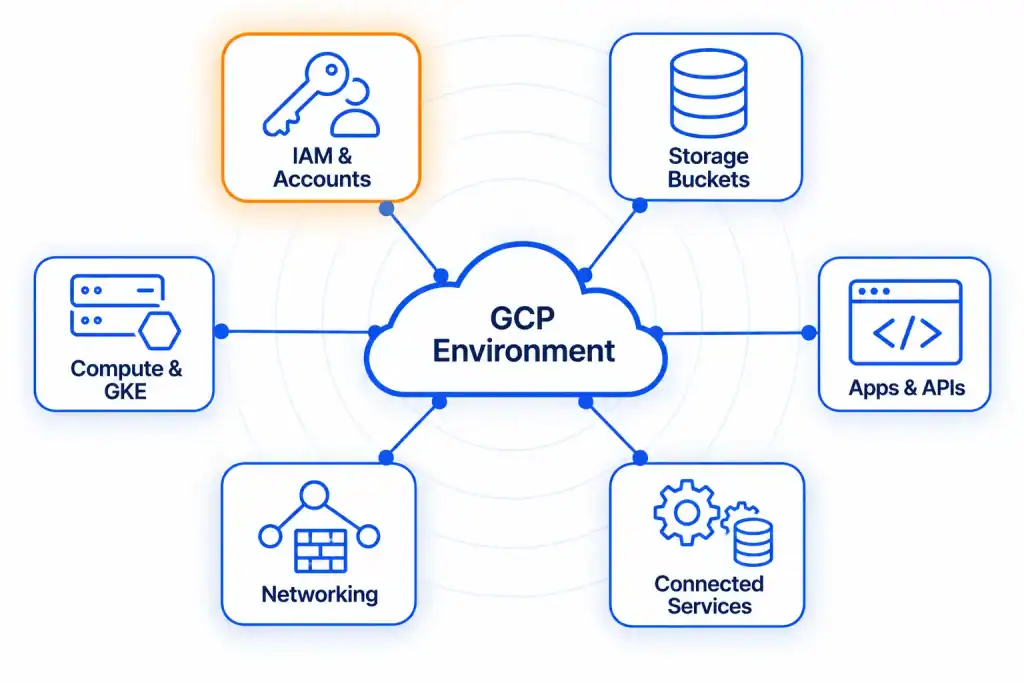
What a GCP Pentest Covers
A GCP pentest focuses on the layers you manage. The usual targets:
| Target | What testers check |
| IAM, roles, and service accounts | Over-permissive roles, weak scoping, and service accounts that can be impersonated to reach other resources |
| Cloud Storage buckets | Public access, permissive sharing, and sensitive files exposed to the internet |
| Compute Engine and GKE | VMs and Kubernetes workloads as prime targets for access and lateral movement |
| Web and mobile apps and APIs | OWASP Top 10-style flaws (SQL injection, XSS, broken access control) and unauthenticated endpoints |
| Networking (VPC, firewall, load balancers) | Open ingress, flat segmentation, and ports reaching databases, caches, or admin panels |
| Connected services | BigQuery, Pub/Sub, Cloud Functions, Cloud SQL, and CI/CD pipelines when they hold data or touch the app |
| Logging and detection | Whether the testers’ own activity was recorded and alerted on |
The Attack Paths Testers Check First
The flaws that matter most chain together, and that’s what separates a penetration test from a configuration scan. These are the GCP-specific paths a tester works through.
Service Account Impersonation
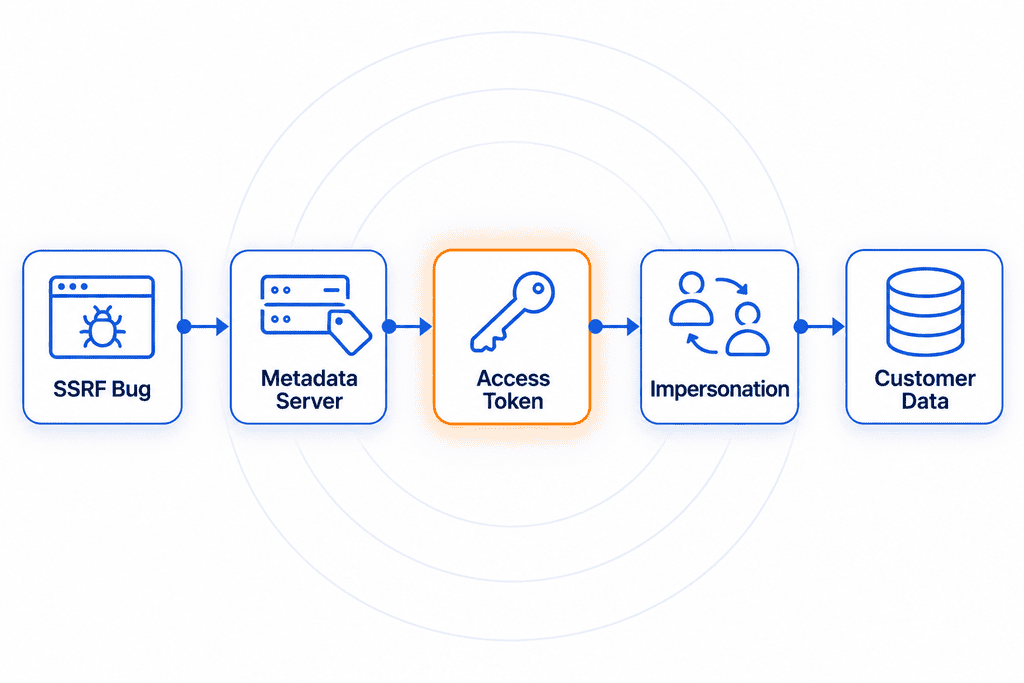
In GCP, one identity can be allowed to act as another. Anyone holding the iam.serviceAccounts.getAccessToken permission on a service account, which the Service Account Token Creator role grants, can mint a token for that account and use everything it can reach:
gcloud auth print-access-token --impersonate-service-account=SA_NAME@PROJECT_ID.iam.gserviceaccount.comTesters map who can impersonate whom, then follow the chain. A low-privilege developer account that can impersonate a deployment account with Owner rights is a path to the whole project. Related permissions get the same attention: iam.serviceAccounts.actAs, which lets someone attach a service account to a new VM or function, iam.serviceAccountKeys.create, and any setIamPolicy permission that lets an identity grant itself more.
The Metadata Server
Every Compute Engine VM can ask a local metadata server for a token belonging to the service account it runs as:
curl -s -H "Metadata-Flavor: Google" "http://metadata.google.internal/computeMetadata/v1/instance/service-accounts/default/token"That’s by design, and it’s why a server-side request forgery (SSRF) bug in a web app is so serious on GCP. If an attacker can make the application send that request, with the required header, they get a working cloud credential. What the token can do depends on the account’s IAM roles and on the VM’s access scopes, so testers check both. Startup scripts and custom metadata get read too, since secrets are often left there.
Default Service Accounts and Long-Lived Keys
New VMs use the Compute Engine default service account unless someone chooses another. Depending on organization policy, that account is automatically granted the broad Editor role. Google blocks the grant by default only for organizations created after May 3, 2024, so many older projects still have it, and code execution on a single VM can mean write access across the project. Testers also hunt for user-managed service account keys, the JSON key files that don’t expire on their own and turn up in Git history, CI variables, and laptops.
Public Buckets
A Cloud Storage bucket is public when its IAM policy grants access to allUsers, or to allAuthenticatedUsers, which means anyone signed in with any Google account, not only people in your organization. Testers enumerate likely bucket names, check each policy, and then look at what’s inside:
gcloud storage buckets get-iam-policy gs://BUCKET_NAMEBackups, exports, and logs are the usual finds, and they often contain the credentials for the next step.
GKE Workloads
A compromised pod is a starting point, not an endpoint. If the cluster doesn’t use Workload Identity Federation for GKE, every workload on a node shares that node’s service account, so a compromised pod can use whatever the account can reach. Testers also check Kubernetes RBAC, whether the control plane is reachable from the internet, and what secrets are mounted into workloads.
Logging Gaps
A good test also measures what you would have noticed. Admin Activity audit logs are always on, but Data Access logs are off by default for most services, and VPC Flow Logs stay off until someone enables them. If a tester can read a bucket or pull records without leaving a trace, a real attacker can stay in the environment unseen.
Typical Findings and Fixes
| Finding | Why it matters | Fix |
| Default Compute Engine service account with Editor and full API scope | Code execution on one VM becomes write access across the project | Give each workload its own least-privilege service account, and enforce the organization policy that stops automatic role grants to default accounts |
| Token Creator granted on a privileged service account | A low-privilege identity can mint tokens for a high-privilege one | Remove the binding, and grant impersonation per account only where it’s needed |
| SSRF that reaches the metadata server | An application bug becomes a cloud credential | Fix the SSRF, and cut the service account’s roles and scopes to what the app needs |
Bucket bound to allUsers or allAuthenticatedUsers | Data is readable by anyone | Remove the binding and enforce public access prevention |
| User-managed service account keys in repos or pipelines | A credential that never expires | Rotate and delete the keys, block key creation by organization policy, and move to workload identity federation |
| Data Access logs disabled | Data can be read without a record | Enable Data Access logs on sensitive services and alert on unusual access |
CYBRI’s guide to common cloud security issues covers the same patterns across providers.
How a GCP Pentest Runs
A GCP engagement moves through the same stages every time:
- Planning and scoping: agree which projects, applications, and IP ranges are in and out of bounds, plus roles and communication channels. Decide the starting access too: most cloud tests begin with read-only credentials, in the same way a gray box test starts with a login.
- Recon and enumeration: map the GCP footprint, from DNS records and subdomains to public buckets and credentials leaked in public repositories.
- Vulnerability discovery: run configuration reviewers such as ScoutSuite and Prowler against best practice, enumerate buckets and IAM bindings with the gcloud CLI, and scan apps and network ports, then prioritize what’s worth exploiting.
- Exploitation: safely prove impact within scope, whether that’s connecting to an exposed database, impersonating a service account, or chaining a leaked credential into lateral movement. Ongoing tests can report findings as they surface.
- Reporting and debrief: every finding with its severity, evidence of exploitation, and a fix, mapped to the frameworks you name, then walked through on a call.
- Remediation and retesting: lock down bucket permissions, tighten IAM roles, patch VMs, and add MFA, then retest to confirm the fixes hold.
When to Test, and What It Proves for Compliance
Test a GCP environment at least once a year, and after any major change: a new application, a migration to new GCP services, a reworked architecture, or a new flow handling sensitive data. If the report serves an audit, name the frameworks during scoping. SOC 2 auditors look for how you find and fix vulnerabilities, PCI DSS requires internal and external penetration testing at least every 12 months wherever cardholder data lives, and HIPAA expects covered entities to evaluate their technical safeguards. None of these name “a GCP pentest” outright, but a dated report with findings and retests is the clearest evidence of due diligence, and one engagement can map to more than one framework. Line the test up with your audit calendar so the report falls inside the period an auditor reviews.
GCP Pentesting With CYBRI
CYBRI runs manual-first GCP testing with senior, US-based, OSCP-certified testers. Each finding, an over-permissive IAM role, an exposed bucket, an impersonation path, is validated with real-world impact and paired with a clear fix rather than flagged and left in a scanner report. You work with the testers directly throughout, critical issues are flagged the same day, and on ongoing programs findings and remediation progress are tracked in the Blue Box platform.
Reports map to SOC 2, ISO 27001, HIPAA, and PCI DSS, and remediation support and a retest inside a 90-day window are part of the quote, so your fixes are confirmed to hold. CYBRI has tested GCP environments across fintech, healthcare, and SaaS. See what’s included in CYBRI’s GCP penetration testing services and wider cloud penetration testing. If you’re still comparing providers, the best GCP penetration testing companies list sets CYBRI beside four others.
Frequently Asked Questions
Is a GCP pentest the same as a configuration review?
No. A configuration review compares your settings with best practice and lists the gaps. A penetration test goes further and exploits them, showing which gaps join into a path to your data. Most engagements include both, with the review feeding the test.
What access do testers need?
Usually a read-only role on the projects in scope, plus test accounts for the applications. That lets testers see IAM bindings and configuration the way an insider or a stolen credential would, and it finds far more than starting with nothing.
Can a pentest affect my cloud bill or performance?
It can. Brute-forcing APIs or enumerating large numbers of buckets and services drives up usage charges and can slow things down. A well-run engagement plans around it with agreed test windows, throttling, and noisy tests kept off production traffic.
Should GCP testing run against production or staging?
Either, or a mix. Staging works when it mirrors production: same IAM, same settings, realistic data. Production testing runs with agreed limits, such as no destructive actions and no denial of service, and a contact who can pause it. Many teams run the riskier tests on staging and a lighter pass on production to confirm the live configuration matches.
How often should a GCP environment be tested?
At least once a year, and after major changes such as a new application, a migration, or a new IAM model. Teams that ship weekly usually move to scheduled tests through the year with retests after each round of fixes.
Get a GCP Pentest Quote
A rough list of the projects, apps, and buckets in scope, plus the audit or deal behind the test, is enough to start. CYBRI turns that into a written scope and a fixed-price quote, then tests your GCP environment manual-first with findings mapped to the frameworks you need. Book a scoping call with CYBRI.