The app your customers download from the App Store and Google Play runs on phones you don’t control. It keeps login details on the device, where whoever holds the phone can go looking, and anyone can download a copy of the app and take it apart. Behind it sits an API (the connection the app uses to pull and save data), and parts of that API exist only to serve the app. A mobile penetration test is a controlled attack on the app and its API, run by a hired security expert to find the weak spots before a real attacker does. This guide explains what the test checks and how the way your app was built shapes it.
Quick Answers
What does a mobile app penetration test cover?
The app and the API behind it. On the app side, the tester looks at what it stores on the phone and what someone could learn by taking its code apart. How deep that goes depends on how the app was built. The API side applies to every app, and its main question is whether one user can reach another user’s data.
Does a web app pentest already cover the mobile app?
Only partly. If the app is a wrapper, meaning your website loaded inside an app shell, much of the work overlaps with the web test. A fully native app, built with Apple’s and Google’s own tools, needs separate testing on real devices, and that setup takes longer.
Can the test check the outside services your app relies on?
The services themselves stay out of scope. Testing an API owned by your payment processor or maps provider would require that company’s written permission, and a pentest of your app doesn’t come with it. What the tester checks instead is how those services are connected to your app, including how the app handles the keys they issued you.
Wrapper, Hybrid, and Native Apps Can All Be Tested
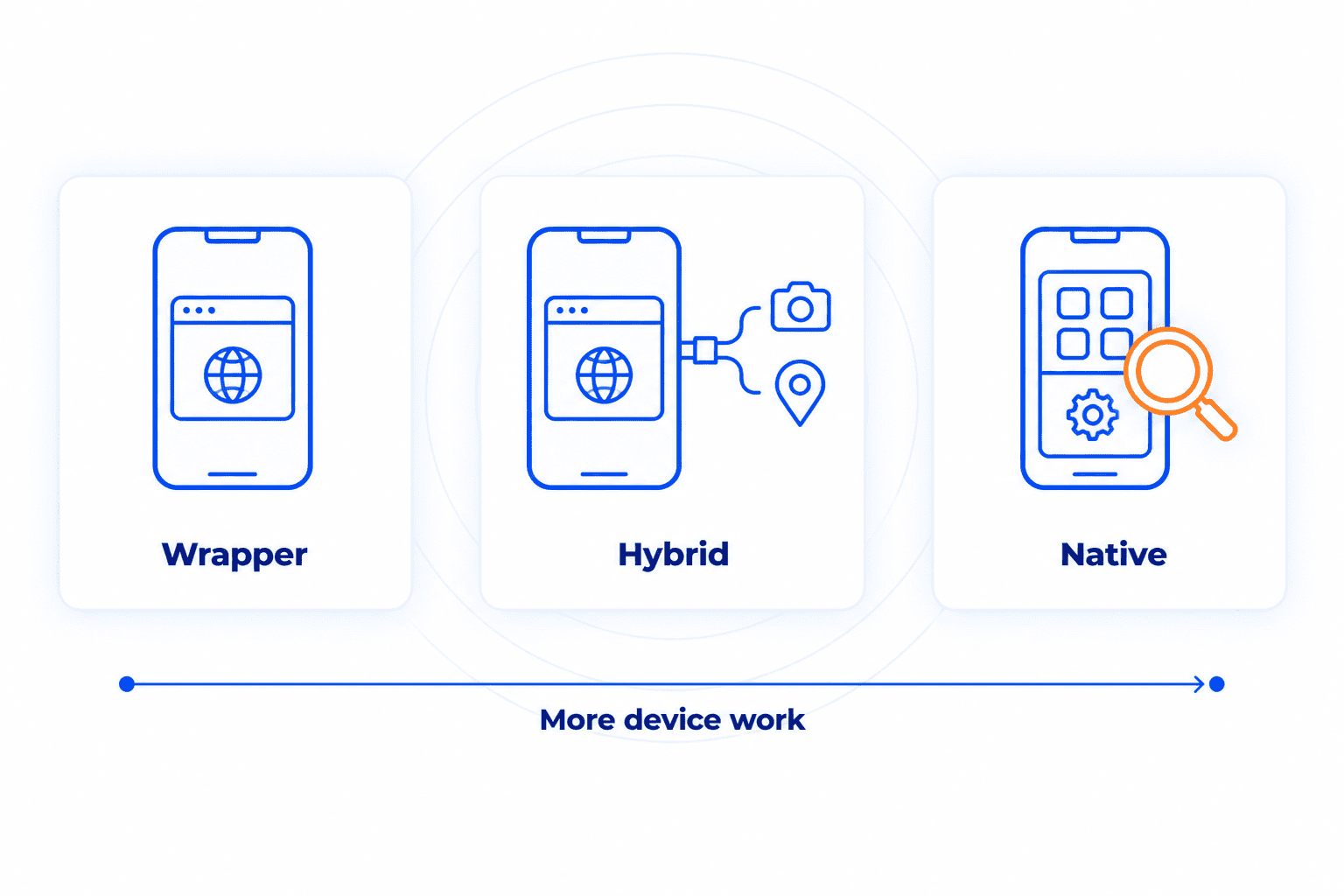
Mobile apps get built in a few different ways, and a pentest can cover any of them. The build type changes where the tester spends the time.
Wrapper apps. These take your existing website, load it inside a thin app shell, and publish it to the app stores. Every screen is a web page, so most of the testing looks like a web app test of the site, its logins, and the API behind it. The phone side stays small. The tester checks how the shell stores the login and whether it lets web pages reach phone features like the camera or saved files.
Hybrid apps. A middle ground. The screens are still built with web technology, but they run inside a real app container that uses add-ons to reach the camera, location, push notifications, and other phone features. Ionic and Cordova are two common ways to build them. On top of the web-side checks, the tester looks at the bridge between the web code and the phone, because a weak spot there can let a web page reach parts of the device it was never meant to touch.
Apps built with React Native or Flutter sometimes get called hybrid too, since one codebase runs on both iPhone and Android. They draw real app screens instead of web pages, though, so testing them looks much more like the native case.
Native apps. Written in Apple’s and Google’s own languages (Swift for iPhone, Kotlin for Android), usually as two separate apps. This is the deepest version of the test. The tester installs each app on a phone they fully control, takes the app file apart, gets past the protections that hide its network traffic, and watches what it stores and sends while it runs. All that device setup is why a native test takes longer than a wrapper test.
If you aren’t sure which type you have, your developers will know, and it’s one of the first questions on a scoping call.
Who Needs a Mobile App Pentest
Any company whose customers sign in through a phone app has something worth testing. Common targets include:
- Healthcare and telehealth apps that carry patient records. Main risk: protected health information (PHI) leaking to the wrong person.
- Airline and travel apps that handle bookings and passport details. Main risk: a stranger viewing or changing someone else’s trip.
- Real estate apps where landlords and renters share leases and ID documents. Main risk: one renter opening another renter’s paperwork.
- Location and tracking apps that know where someone is right now. Main risk: a leak that reveals a person’s live whereabouts.
- Gambling and sports betting apps that hold real money. Main risk: account takeovers that drain balances.
- Trading and finance apps that move funds and place orders on a user’s behalf. Main risk: trades or transfers nobody authorized.
- Energy and mining apps that stay connected to field equipment around the clock. Main risk: that always-on link becoming a way into operational systems.
The list doesn’t stop there. Retail, delivery, internal employee tools, and any other app your customers or staff depend on can go through the same test.
Why a Mobile App Needs Its Own Test
For many of these businesses, the app is where customers spend most of their time with you, so a flaw in it reaches people fast. Yet apps often get less security attention than the website, and two things about how apps work make that gap risky.
The first is that the code leaves your control. A website keeps its code on your servers and sends users only the finished page. An app ships the whole package to every phone that installs it, and anything written inside, such as a password or an access key for another service (known as a hardcoded secret), can be pulled back out.
Then there’s the server side. Apps often call parts of the API the website never touches, such as features that exist only on the phone, and a web pentest can pass right over them. Old app versions widen the gap. Customers don’t always update, so the API keeps answering the version from two years ago, along with whatever flaws it shipped with.
A mobile pentest covers both halves, the app and everything it talks to, but how the app half gets tested depends on how the app was built. For a native app, installing it on a test phone is the core of the work, since running it is how the tester sees what it stores and sends. A wrapper usually skips that step, because its screens are web pages the tester can examine much like a website. The API half gets tested either way.
What a Mobile Pentest Checks
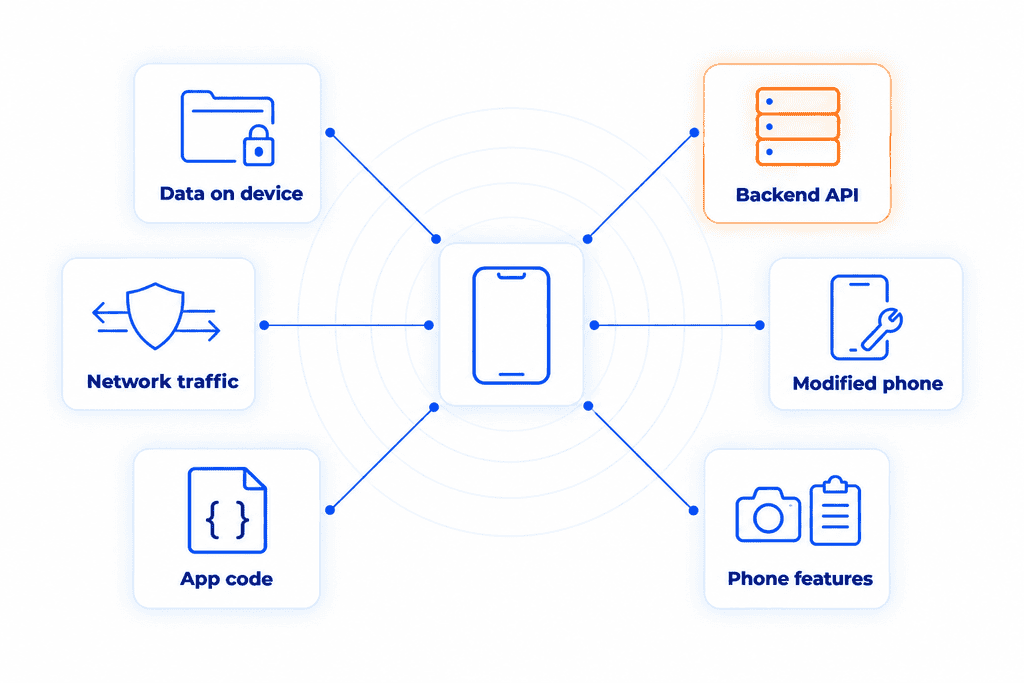
A credible test follows OWASP’s Mobile Application Security Verification Standard (MASVS), the industry checklist for mobile apps. The work falls into six areas.
What the app leaves on the phone. Login tokens and personal data stored on the device shouldn’t be readable if the phone is stolen.
How the app talks to your servers. Traffic should be encrypted and go only to your real server, a rule some apps enforce with certificate pinning.
The API behind the app. Most of the costly findings land here. The tester tries to open other users’ records by changing an ID in the request, a flaw known as IDOR or BOLA, and checks that app-only features don’t skip the website’s security checks. This part overlaps with an API penetration test.
What’s inside the app file. Taking the app apart, known as reverse engineering, can expose keys written into the code and test features nobody removed.
How the app behaves on a phone the attacker controls. On a jailbroken or rooted phone (one with the maker’s restrictions removed), the tester tries to modify the app to skip a payment or login step.
How the app uses phone features. Unneeded permissions and data leaking through the clipboard or screenshots.
Testing runs with an account for each user role and a current app build, known as gray box testing, and a major release is a natural point to test again.
What the Test Can’t Touch: Third-Party Services
Few apps run on your own code alone. Payments in many apps go through services like Stripe or PayPal, often by way of an SDK (a ready-made code package from another company, built into the app). Both belong to someone else.
Those outside servers stay off-limits. No matter how closely a service is tied to your app, attacking it needs the owner’s written sign-off, which sits outside the scope of testing your app.
Your side of each connection is fair game, and it is where problems tend to start. The tester looks at where the app keeps the keys those services issued and what customer data it passes along. A broken or unexpected reply from the payment service shouldn’t crash the app or spill anything onto the screen. Bundled SDKs get a look too, because an outdated one can leak data or bring its own known flaws into your app.
How CYBRI Tests Your Mobile App
Timing follows the build. A wrapper app usually takes around 5 days of testing, since most of the work mirrors a web test. Native apps run closer to 10 to 15 days, because each platform needs its own device setup before testing starts. The number of user roles and features can move those figures either way, so the final estimate comes out of a short scoping call.
Every CYBRI mobile test includes:
- Senior, OSCP-certified testers working manual-first.
- Authenticated testing by default, signed in as each of your user roles, where most access problems hide.
- Same-day alerts on anything critical, without waiting for the final report.
- A report for two audiences: a plain summary for leadership and auditors, plus technical findings scored on CVSS 4.0, the standard severity scale, each with steps to fix it.
- Findings mapped to your compliance framework, so the report doubles as audit evidence.
- A walkthrough call with the testers after the report is delivered.
- Retesting of your fixes once your team has made them.
To find out how long your app would take to test, contact CYBRI and share how it was built.
Frequently Asked Questions
Do both the iOS and Android versions need testing?
Usually, yes. The two systems store data and handle security in different ways, so a flaw on one platform may not exist on the other. If both versions come from one shared codebase, part of the work carries over and the second platform goes faster.
What does the tester need from your team?
A current test build of the app for each platform and a test account for every user role. Most tests point at a staging copy of your backend. Production works too, as long as both sides agree on limits before testing starts.
How often should a mobile app be retested?
A yearly test is a good baseline, and a retest is worth scheduling after any release that changes how users sign in or pay. Mobile teams ship updates often, and the changes add up between tests.
What does a mobile app pentest cost?
Price follows scope, mainly the build type, the number of platforms, and how many user roles and features the app has. CYBRI’s pricing page shows current starting points.
Test the App and Everything Behind It
There’s no need to work out whether your app counts as a wrapper or a native app before reaching out. A short scoping call goes over how the app was built and what it connects to, then sizes a test around both. Contact CYBRI to get started.