Nearly every modern product runs on APIs (application programming interfaces), the hidden connections your website and mobile app use to fetch and change data on your servers. That explains why the phrase “OWASP API Top 10” now turns up in sales and audit paperwork. A larger client puts it on the vendor questionnaire, or an auditor asks whether last year’s test checked against it. This guide walks through the list in business terms and what a penetration test (an authorized attack by hired security testers) needs to check before a quote promising “OWASP coverage” means anything.
Quick Answers
What is the OWASP API Security Top 10?
It is a ranked list of the ten weaknesses that most often get APIs broken into, published by OWASP, a nonprofit whose security guidance auditors and testing firms treat as the common reference. The current edition dates from 2023. OWASP also publishes a better-known Top 10 for web applications, which is a separate list, so check which one a provider means.
What is the biggest risk on the list?
Broken object level authorization sits at number one. A logged-in customer changes an order number in a request and gets back somebody else’s order, because the API never checked who owns it. Two other entries in the top five come down to the same kind of permission mistake.
Does a vulnerability scan cover the list?
Some of it, yes. Automated tools quickly flag misconfigured settings across hundreds of endpoints. The rest depends on knowing your business, for example that a dispatcher should never open payroll records. An experienced tester brings that judgment, which is why the strongest tests combine both.
API Pentest Use Cases
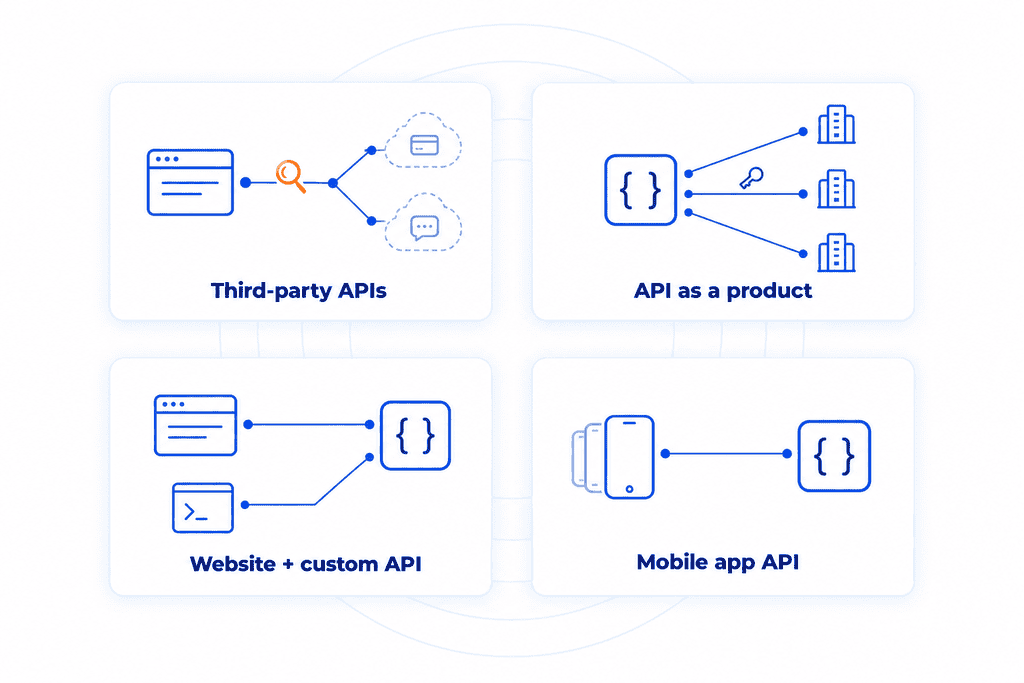
How an API test is scoped depends on whose API it is and what calls it. Most companies land in one of four situations, and plenty fit more than one.
Your application relies on third-party APIs
Many products lean on outside services for the heavy lifting, such as Stripe for payments or OpenAI for a chatbot. Testers don’t attack those providers, since you don’t own their systems and have no permission to test them. The test covers your web app and the way it connects to each service. Typical findings include a secret API key left in the website’s code where any visitor can read it, or a payment webhook (the message a provider sends to confirm an event) that the app accepts without checking where it came from.
You sell an API and have no application
For some companies the API is the whole product, whether a data feed or a developer platform that customers plug into their own software. With no screens to click through, testers go straight to the endpoints, working from the same documentation your customers get. The biggest question is separation between clients. If one customer’s API key can pull another customer’s data, every account is exposed at once, and a finding like that can end an enterprise deal. Testers also push on API keys and usage limits to see whether paid tiers hold up against someone trying to get more than they pay for.
You built your own API behind your application
A custom API that your own web app talks to. The test covers both, because the website only sends the requests its screens need, while the API will accept anything. Testers use the site the way customers do, then call the API directly to reach the endpoints and old versions the site never touches.
Your mobile app talks to an API
Every mobile app depends on a backend API, and that API often gets less scrutiny than the website’s. Anyone can download the app and unpack it to find the endpoint addresses, sometimes with keys stored right inside. Older versions of the app stay on people’s phones for years, so the API versions they call keep running long after the team has moved on. A mobile API test reviews the app itself along with the API behind it.
Most API Breaches Happen After a Successful Login
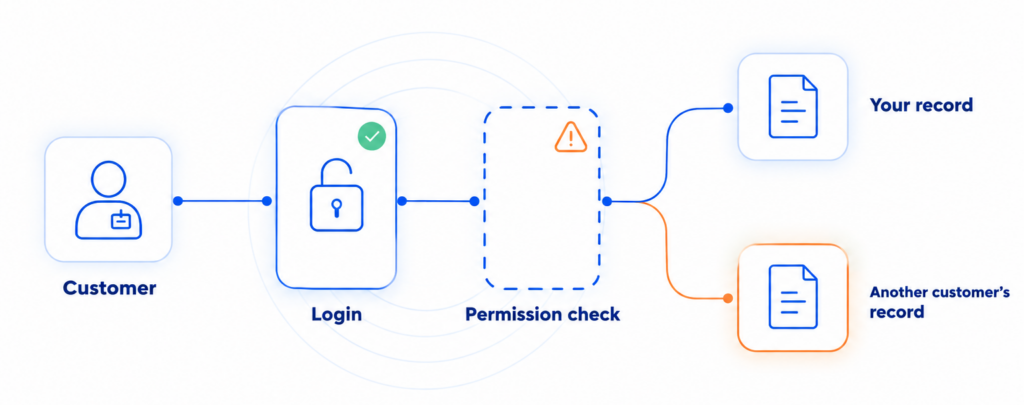
Two terms carry most of API security, and they sound almost identical. Authentication is the login, confirming who you are. Authorization decides what you’re allowed to see and do once you’re inside. Most API breaches pass the first check without trouble and fail the second, and the person exploiting them often holds an ordinary customer account. Because these flaws sit behind the login, API tests usually run gray box: testers get a login for each of your user roles plus the API documentation, but not your source code. CYBRI’s guide to black, gray, and white box testing compares the options.
Three of the top five entries on the OWASP list are authorization failures. In each, the API hands over a record without checking who owns it, or lets a regular user run a function meant for admins. Read that way, the list is less a technical checklist than a record of how real companies’ APIs have been broken into, ranked by how likely and how damaging each one is.
Last year’s web app pentest may have touched your API, though only through the requests your screens send. Attackers write their own and aim them at every endpoint (one specific address on the API, such as “update shipping address”), including old versions and mobile APIs a web test often skips.
The numbers add up fast. An API with 60 endpoints and 4 user roles involves 240 separate permission decisions, and each one has to be right after every release. A single wrong answer is enough for a breach.
What the OWASP API Top 10 Covers
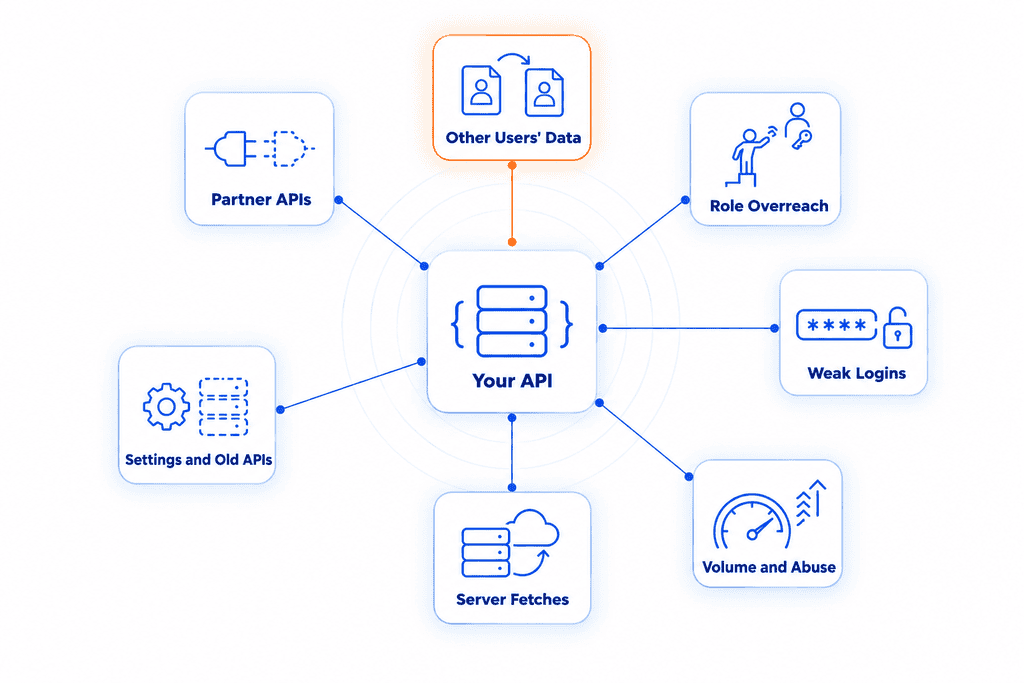
OWASP ranks ten risks, and several describe the same failure from different angles, so they’re easier to follow grouped by what an attacker walks away with. Everything below comes from the 2023 edition, the current one.
Reading other people’s data (OWASP API1). Broken object level authorization, the top entry, happens when the API returns a record simply because someone asked for it by number. A patient logs in to a clinic’s portal, notices their appointment shows up as 58213 in the request, tries 58214, and reads a stranger’s visit notes. Nothing about that request looks unusual, so it rarely trips an alarm. Security teams also call this IDOR (insecure direct object reference), and CYBRI’s article on IDOR, BOLA, and privilege escalation covers it in depth. Testing for it means logging in as one user and requesting another user’s records on every endpoint that takes an ID, which for a busy API adds up to hundreds of checks.
Doing more than your role allows (OWASP API5 and API3). A regular user sends a request meant for the admin panel, and the API runs it because the only check lived on the admin screen. In a close relative (API3), the user edits their own profile, slips an extra field like “account type: admin” into the request, and the API saves it. The same entry also covers the reverse problem, where the API sends back far more than the screen displays, such as a full customer file with internal notes when the app shows only a name. With several user roles, each endpoint needs the right answer for every one of them, which is how the 240 decisions mentioned earlier add up.
Weak logins (OWASP API2). Default passwords left on old test accounts, or login tokens (the digital pass an app issues after sign-in) that never expire. Any one of them lets someone sign in as somebody else, after which the rest of the system treats them as legitimate.
Volume and abuse of working features (OWASP API4 and API6). Without rate limiting (a cap on how many requests one account can send in a given time), a single script can run up your cloud bill or take the service down. API6 is subtler. A feature works as designed, but someone automates it at a scale that hurts the business, like buying out a concert’s tickets for resale or opening thousands of accounts to collect a sign-up bonus. Deciding where normal use ends and abuse begins takes someone who understands how your business makes money.
Making your server fetch things for an attacker (OWASP API7). Features that pull in a web address, such as an image import or a webhook, can be pointed at internal systems instead. On cloud hosting, that can expose the credentials that control the whole account.
Loose settings and forgotten APIs (OWASP API8 and API9). Debug mode left on in production and error messages that reveal how the system is built both count as misconfiguration. API9 covers what nobody is watching: an old version of the API still running next to the new one, or a staging copy reachable from the internet. A test can only reach the APIs someone knows about, so an up-to-date inventory comes first.
Trusting partner APIs too much (OWASP API10). Your API pulls data from payment processors or AI models and often uses it unchecked. If one of those partners is compromised, your system acts on whatever it sends.
Automated tools handle the settings and inventory entries well and speed up volume testing. The permission and business-flow entries at the top of the list are where a tester’s experience with how companies operate pays off, so a strong engagement leans on both.
What Compliance Says
Auditors don’t check for “OWASP API Top 10 coverage” because no major framework requires the list by name. What they look for is a credible test of every system that handles regulated or customer data, run with an industry-accepted method, and OWASP is the reference most testers use for applications. If your APIs carry that data, they belong in the testing evidence for SOC 2, PCI DSS, HIPAA, or ISO 27001.
PCI DSS sets the clearest rule. Requirement 11.4 calls for penetration testing at least once a year and after any significant change, and it explicitly includes the application layer, which for most payment flows means the API.
Healthcare companies meet the same question in a different form. An API behind a patient portal or a scheduling app serves protected health information, which places it inside the technical evaluation HIPAA’s Security Rule expects.
Enterprise customers often skip the frameworks and ask outright on the vendor questionnaire. A report that tags each finding with its API Top 10 entry gives them a ready answer.
How CYBRI Tests Your API
CYBRI tests APIs the way attackers use them, sending requests straight to the endpoints while logged in as each of your user roles. Testers first map every endpoint, including old versions and anything the documentation missed, then work through the OWASP API Top 10 against your own business rules. To start, testers need your API documentation (a Postman collection or an OpenAPI/Swagger file works), a test account or API key for each user role, the address of the environment to test, and a heads-up on any firewall rules that need to let them in.
APIs change constantly, so plan a retest when you ship a new API version, add a user role, connect a new partner, or change how logins work.
Every CYBRI API test includes:
- A senior OSCP-certified pentester leads the work, testing by hand first and using automated tools to cover ground faster.
- Authenticated testing under every user role you have, which is where permission flaws surface.
- Same-day notice of any critical finding, ahead of the final report.
- Two reports in one: a plain-language summary for leadership and auditors, plus technical findings rated on CVSS 4.0 (the standard severity scale) with steps to fix each.
- Findings mapped to your compliance framework, ready to hand to an auditor.
- A call with the testers after delivery to walk through the results.
- A retest of your fixes, included with API engagements, to confirm each one holds.
Contact CYBRI to scope a test for your API.
Frequently Asked Questions
How long does an API pentest take?
A basic scope takes about 5 business days, report included. Larger APIs with more endpoints or user roles usually run 10 to 15. The clock starts once testers have working access, so getting accounts and documentation ready before kickoff saves time.
How can you tell if a provider tests the API Top 10 properly?
Ask how they handle the top of the list. A solid answer describes testers logging in as different users and trying to reach each other’s records, plus a report that labels every finding with its API Top 10 entry. A vague promise of “full OWASP coverage” with no mention of user roles deserves a follow-up question.
Test Your APIs Before Someone Else Does
You don’t need a list of every endpoint before reaching out. A short scoping call works out what your API exposes and which user roles it serves, then sizes a test to match. Contact CYBRI to set it up.