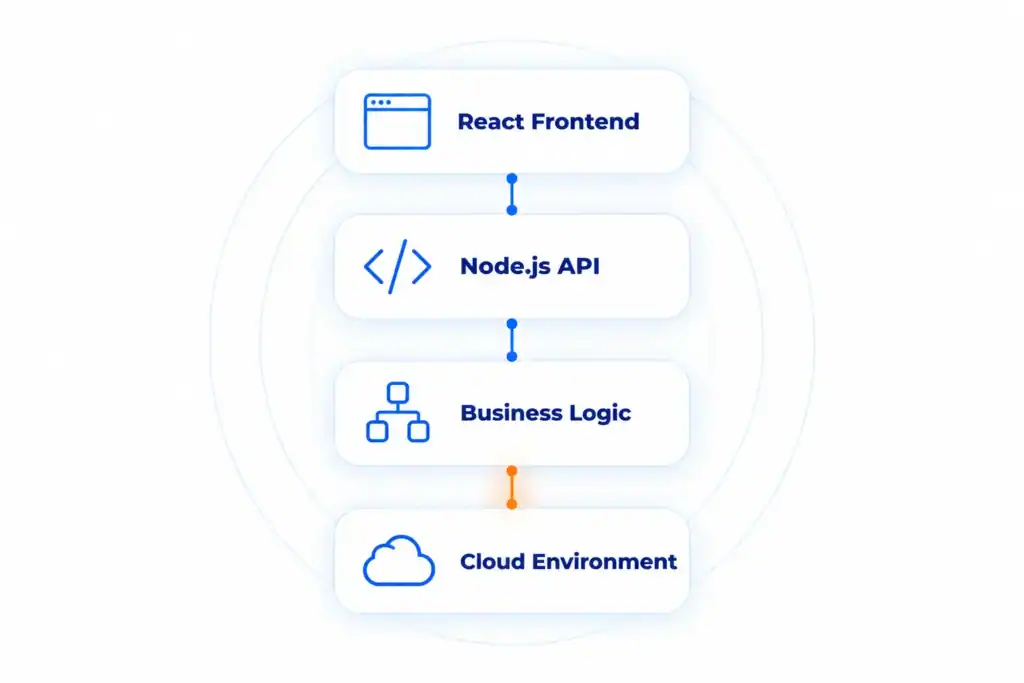
React and Node.js rarely travel alone. There’s a browser app, an API behind it, the logic that API runs, and a cloud account holding all of it, and a proper penetration test has to cover all four. This piece walks through what gets tested at each layer, then turns to the practical questions. What does a tester need from you? How long will it take? What’s in the report at the end, and what’s the bill?
Quick answers
What is a React and Node.js penetration test?
One test, four layers, treated as a single attack surface: the React frontend, the Node.js API behind it, the business logic those endpoints enforce, and the cloud underneath. It tests them together rather than one layer at a time.
Does a React app always run on a Node.js backend?
No. React runs in the browser, and it’ll pair with a backend in Python, Java, Go, .NET, or Node all the same. You see it next to Node so much for one reason: they’re both JavaScript. Neither one needs the other, though. For this test, the only thing that matters is that the API behind your React app runs on Node.
What does the test usually find?
The same short list shows up on almost every engagement. Broken API authorization. Mass assignment, where a user sets a field like “role”:”admin” on their own account. Business logic abuse, from slipping past limits to skipping workflow steps or racing concurrent requests. And cloud settings that let a small app bug reach real customer data.
How long does it take and what does it cost?
A React app and its Node.js API start at $5,000 and take about 5 business days. Adding the cloud environment brings it to $9,500 and about 10 business days, and larger setups with several apps or cloud accounts run 15 or more. Note the clock: it starts when the tester has access to everything in scope, not when the contract is signed.
What a React and Node.js Pentest Covers: Scope at a Glance
A full-scope test looks at each layer of the stack. Each layer has its own weak spots. The findings that matter rarely sit inside a single layer, though. They turn up where one layer passes data or trust to the next.
| Layer | What gets tested | Typical finding |
| React frontend | JavaScript bundle, source maps, client-side route guards, XSS sinks | Admin routes and API keys baked into the shipped JavaScript |
| Node.js API | Object- and function-level authorization, mass assignment, injection, JWT handling, SSRF, rate limits | A user sets “role”:”admin” on their own profile and the API saves it |
| Cloud environment | Identities and roles, secrets, storage, networking, and how the app reaches them | An app bug reaches an over-permissioned identity that can read every secret |
API Testing: Where Most Node.js Findings Come From
Your React app is only one client. Anyone can skip it and talk to the Node.js API straight through a proxy, sending requests the interface would never let them make. That’s why the API soaks up most of a test’s effort, and why most findings live there.
Broken authorization (BOLA and BFLA). The classic API bug: an endpoint hands back or changes an object without checking that the caller is allowed to. Swap an ID from your own to someone else’s, or hit an admin-only route as a plain user. It should be blocked. Often it isn’t. CYBRI’s IDOR and privilege escalation guide goes deep on both.
Mass assignment. Node APIs on Mongoose or Prisma tend to drop a request body straight into a database write. If the model holds fields the user shouldn’t control, sending them anyway sometimes works:
{ “email”: “[email protected]”, “role”: “admin”, “isVerified”: true }
A profile-update route that saves the entire object hands that caller an admin account. The fix is boring but reliable: allow-list the fields a user is allowed to touch.
Injection. Two flavors are specific to this stack. NoSQL injection trades an expected string for a query operator, so a login body carrying { “$ne”: null } instead of a password can match any user. Prototype pollution slips a __proto__ key into JSON that a deep merge then copies onto every object, which is enough to flip an access check or take the process down.
JWT handling. Tokens get checked for a pinned algorithm (so alg: none or a swapped one is refused), a real expiry, a signing secret that isn’t guessable, and proper invalidation when someone logs out or changes a password.
Rate limiting and resource use. Login, password reset, and export endpoints get poked for missing limits, the kind that open the door to brute forcing or expensive calls repeated at will.
Framework configuration. The server itself gets a once-over: CORS that echoes any origin while still allowing credentials, errors that spill a stack trace, absent security headers, a .env sitting where anyone can grab it.
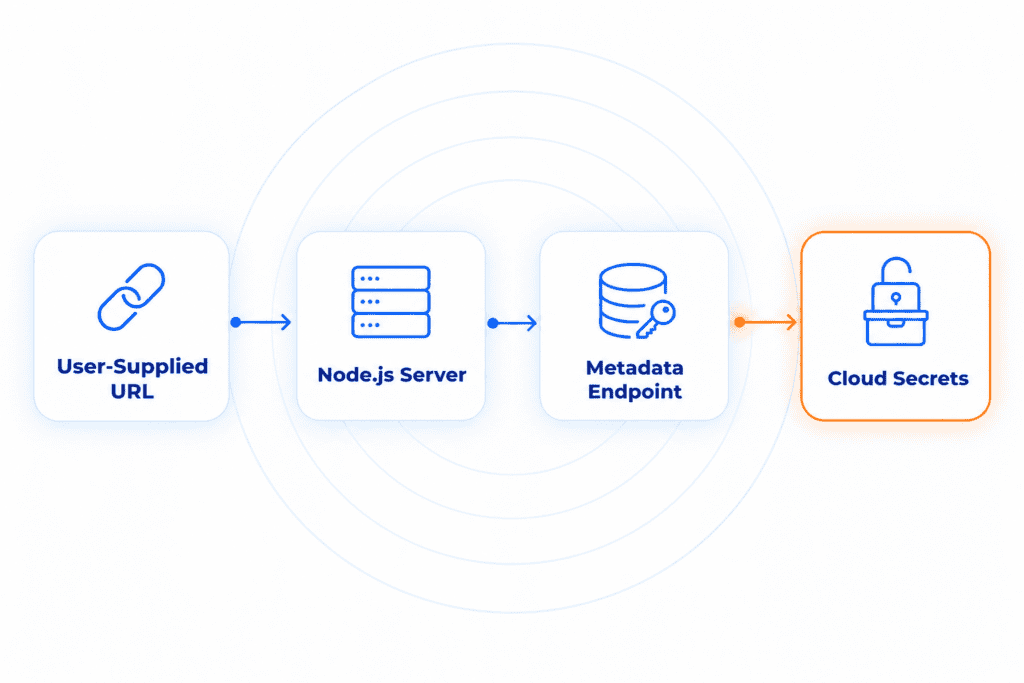
Server-side request forgery (SSRF). Anywhere the server fetches a URL the user handed it (webhooks, link previews, PDF or image generators), the tester tries to redirect that request at internal addresses. Rated on its own, it’s a medium. On a cloud host, it’s the front door to the environment.
The cloud section picks up that SSRF thread. The other thread is business logic: valid requests, wrong outcomes. It’s next.
Business Logic: The Most Important Part of the Test
The tester begins by working out how the product is supposed to behave. They follow every workflow that touches money or permissions (signup, invitation, checkout, refund, plan change, approval) and write down the order the steps should run in, plus whatever limits apply. Then the harder part: finding a way around those rules. Act on a record while it’s in the wrong state. Swap an identifier like a plan tier or account ID partway through. Reuse a token that’s supposed to be single-use. Run the steps out of order.
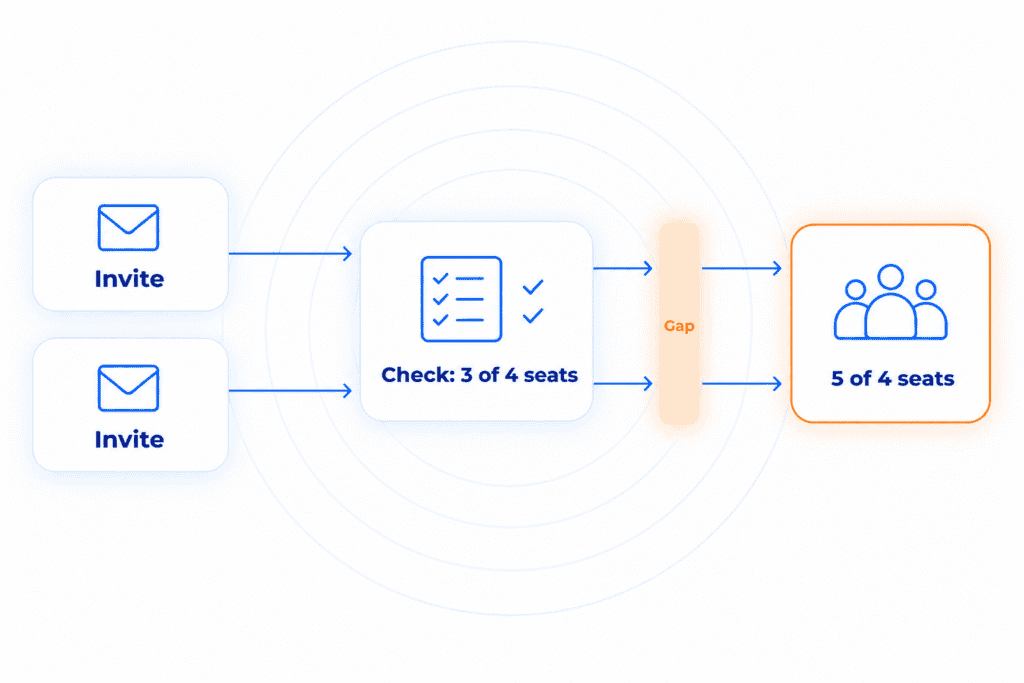
Concurrency is a particular soft spot for Node. A handler usually reads a value and writes based on it across two different await calls. Check the seat count, then add the member. Read the balance, then deduct it. Those two steps don’t happen as one, and the gap between them is the time-of-check-to-time-of-use window. Fire two requests into that instant and both clear the check before either one writes. It’s the race behind a four-seat plan letting in a fifth member. OWASP’s 2025 Top 10 for Business Logic Abuse calls this out by name, under Concurrent Workflow Order Bypass, and the tooling now makes it something you can test on purpose instead of stumbling into.
In a typical multi-user product, and especially in SaaS, these are the workflows a tester goes after:
– Slipping past a seat limit by firing several invitations at once.
– Dropping to a cheaper plan but holding onto a feature the old one paid for.
– Approving your own request in a flow that’s supposed to need a second person.
– Reusing a password-reset or invite link well after it should have died.
– Crossing tenant boundaries: a user at client A changes an account or record ID in a request and pulls up data that belongs to client B. This is IDOR, or BOLA in API terms, and in a multi-tenant product it’s usually the most damaging finding in the report.
AI agents get the same treatment when a product has them. If an assistant can call internal tools or APIs on a user’s behalf, the tester checks whether it respects that user’s permissions.
The layer underneath is where the stakes jump. An app bug like that earlier SSRF can reach into the cloud the whole system runs on, and a medium finding turns critical.
The Cloud Layer: Config Review, Pentest, and Why an App Bug Reaches It
Two different kinds of cloud work sit behind a React and Node.js app. They answer different questions.
A cloud configuration review is read-only. Working from a Reader or security-audit role, the tester measures the environment’s settings against a benchmark (the provider’s CIS Foundations Benchmark, or its own baseline) and flags what’s unsafe. Broad, quick, low risk. It answers one question: is this set up safely?
A cloud penetration test is the adversarial half. It starts from the app, or a low-privilege account, and pushes toward real data. The question there: what can an attacker actually walk away with? On a full-scope job the two run side by side. The review flags what’s misconfigured, and the pentest shows what someone can do with it.
The reason the cloud belongs in the same engagement is blast radius. It holds the identities and secrets the whole system leans on, so a mistake there isn’t contained to one request. One over-permissioned identity, or a single public storage bucket, is enough to turn a small app bug into access to every customer’s data.
This is the moment the API-section SSRF pays off. On a cloud host, that request can be steered at the instance metadata endpoint, whether that’s Azure managed identity, AWS IMDS, or the GCP metadata server. Pull a token off it and you may reach storage or secrets the app should never expose. Whether that works depends on how the endpoint is protected. Many metadata endpoints require a specific request header, and a basic SSRF can’t always add one. It’s still worth trying every time. Two other bridges are common: secrets or a .env leaked in the frontend bundle that turn out to be live cloud keys, and public storage parked next to user uploads.
A word on permission. None of the big providers ask for advance notice to test resources you own. Each does publish rules of engagement, though: no denial-of-service, no volumetric fuzzing, nothing outside the assets you control, and no pivoting into the provider’s own services. An outside tester also needs written sign-off from whoever owns the resources. CYBRI keeps the per-provider specifics on separate Azure, AWS, and GCP pages, and the cloud testing overview ties them together.
How the Engagement Runs: Stages, Access, and Deliverables
The layers above get tested in a set order, outside-in, the way an attacker would work. Each stage hands something to the next, and that sequence is what turns a few scattered weaknesses into one provable impact.
- Mapping. The tester starts in the React bundle and its source maps, digging out API endpoints, user roles, and routes that were never meant to be public. That builds a picture of the full API surface and the workflows behind it. It’s the lightest part of the test, and CYBRI’s frontend penetration testing guide walks through it in full.
- Web app and API testing. The tester captures every call the React frontend makes to the Node.js backend in an intercepting proxy, then replays and alters those calls directly. If the API is in scope on its own, the team shares its documentation (a Postman or OpenAPI collection), so endpoints the frontend never calls get tested too. Checks follow the OWASP Top 10 for web apps and the OWASP API Security Top 10.
- Business logic. Now the workflow map earns its keep, as the tester tries to break the rules the product assumes.
- Cloud. The best app findings, SSRF especially, get pushed toward the cloud to see how far they reach, with the configuration review running alongside.
- Chaining and reporting. Findings get combined across layers to show the real impact, then written up.
Most engagements run grey-box. The tester gets real access rather than probing blind, and skips the blind spots a code-only audit tends to leave. Hand over the Node.js source and it turns white-box, which digs deeper, though it’s optional and not needed to start.
Every CYBRI report ships with the same set of deliverables. Every finding carries a severity, proof-of-concept evidence, the steps to reproduce it, and fix guidance a developer can pick up and run with. Each one also ties back to whichever framework the team answers to at audit time: SOC 2, ISO 27001, PCI, HIPAA. After remediation, a complimentary retest confirms each issue is closed. And the testers stay available to answer questions about the findings.
What It Costs
Pricing tracks scope. A React and Node.js product on the cloud lands in the middle row here.
| Scope | From | Timeline |
| Web app | $5,000 | 5+ business days |
| React app + Node.js API + cloud | $9,500 | 10+ business days |
| Several apps, APIs, and clouds | $20,000 | 15+ business days |
The clock starts when the tester has every in-scope asset in hand, and the pricing page has the full ladder. Inside a tier, what moves the number is how many user roles and distinct workflows the app has (each one that works differently adds testing time), how many screens and API endpoints there are, whether the cloud is in scope, and how many apps and cloud accounts are on the table.
How to Prepare for a React and Node.js Pentest
Having these ready keeps the test on schedule and the results accurate:
- App URLs and which environment is in scope (staging, production, or both). If it’s staging, how closely it matches production.
- A test account for each user role.
- API docs, or a Postman or OpenAPI collection.
- The workflows that move money or permissions (billing, invitations, approvals).
- Which cloud the app runs on (AWS, Azure, or GCP) and a read-only role or account for the tester, with the ground rules agreed up front: no denial-of-service and no social engineering.
- Any third-party integrations or webhooks in play.
- One technical contact who knows both the frontend and the backend, to answer the tester’s questions and supply any extra setup details.
- Every department told the test is coming and kept in the loop while it runs, so nobody mistakes it for a real attack.
Get Your React and Node.js App Tested
If your product runs React on a Node.js API in the cloud, the fastest way to learn what an attacker could reach is to have it tested. Request a demo, and CYBRI will scope your app, API, and cloud, then come back with a quote and a timeline you can plan around.
Frequently Asked Questions
Can a React and Node.js penetration test support SOC 2 or ISO 27001 compliance?
It does, and compliance is often the very reason a test gets booked. Each finding is tagged to the standard you report against, whether that’s SOC 2, ISO 27001, PCI, or HIPAA, so an auditor can trace it straight to a control. The write-up stands on its own as evidence: what was found, proof it was real, and a retest confirming the fix held.
How does a race condition become a vulnerability in a Node.js app?
A Node.js request handler often checks a value and then writes based on it across two separate await calls, and that leaves a gap called a time-of-check-to-time-of-use window. Fire many requests at once and they can all pass the check before any of them writes. That’s how a four-seat plan ends up accepting a fifth member.
What is the difference between grey-box and white-box penetration testing?
Grey-box means the tester works with real access, test accounts and the like, but no source code. Share the source as well and it becomes white-box, which reaches further into the app. React and Node.js work is grey-box by default.