This article explains how frontend penetration testing works and why user roles are central to it. It covers IDOR, BOLA, and privilege escalation, how each maps to OWASP and ASVS, and what a real test looks like step by step.
Most modern web apps share the same basic shape:
- A JavaScript frontend.
- A backend API behind it.
- A set of user roles controlling who can see and do what.
A scanner can see the first two. Most have no concept of the third, and not all of them can run sessions for two different roles at once, which is the minimum needed to check one role against another. That third piece is exactly where IDOR, BOLA, and privilege escalation live, and it’s why a manual penetration test matters: a tester logs in as each role and checks every boundary directly.
Quick answer
- Frontend penetration testing means testing a client-side application (React, Angular, Vue, or similar) and the APIs it depends on, looking for access-control failures that let one user role reach another role’s data or functions.
- The vulnerability classes that show up most: IDOR (Insecure Direct Object Reference), BOLA (Broken Object Level Authorization), and privilege escalation. All three are authorization failures, not authentication failures: one account reaching data or actions it was never granted, whether that account has the same role as its target or a lower one.
- User roles: a real test enumerates every role in the application, then replays each role’s requests against every other role’s data and functions, instead of trusting what the interface shows.
- Automated scanners routinely miss role-based access-control failures. Most don’t compare multiple authenticated roles side by side, and they have no way to judge whether an action is logically supposed to succeed, they just compare results against known patterns.
- Jump to what to expect during the test for a closer look at what gets checked.
What Is Frontend Penetration Testing?
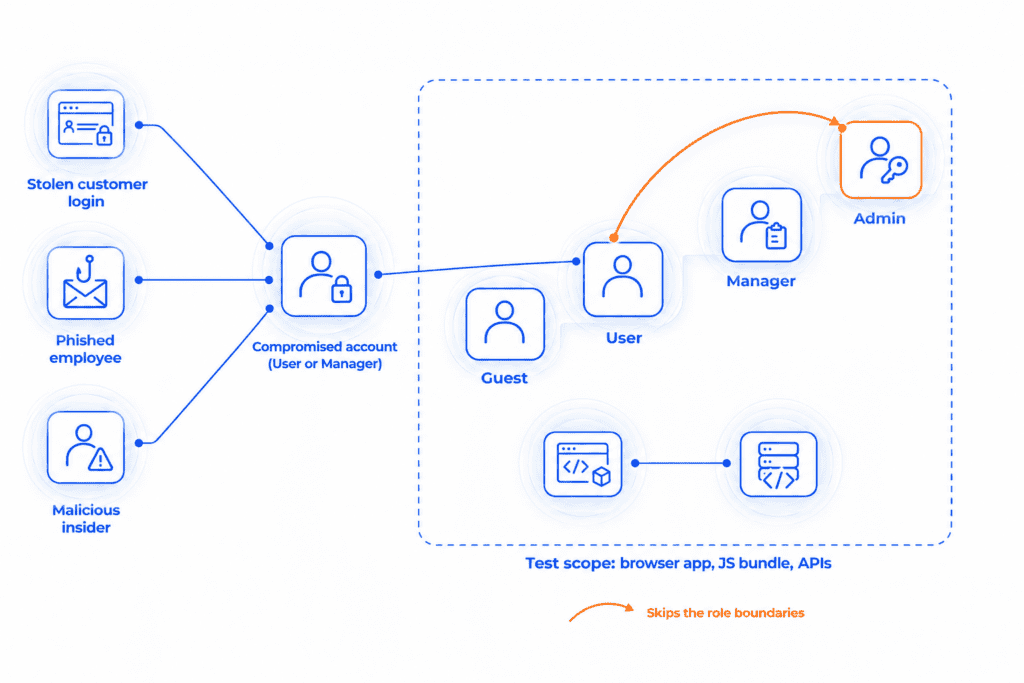
Frontend penetration testing is an adversarial assessment of a client-side application and the APIs it depends on, aimed at finding access-control failures between user roles. A tester works like an attacker holding a low-privilege account would, trying to cross the boundary between what a Guest, a User, a Manager, and an Admin can each see and do. It’s hands-on work, not a code review and not a vulnerability scan.
An attacker rarely needs to break into an Admin account directly. A stolen customer login, a phished employee, or a malicious insider is enough if the app fails to enforce role boundaries, because a low-privilege account can then do what an Admin can. The damage is the same as a compromised Admin account, and a test finds out whether that’s possible before an attacker does.
The scope is the application running in the browser, including anything shipped in its JavaScript bundle, plus the API calls behind it. Servers, firewalls, VPNs, and the network layer belong to a network or infrastructure pentest instead.
React comes up often in this article’s examples, since it’s used by about 47% of professional developers, more than any other JavaScript framework. The access-control issues covered here apply the same way regardless of framework.
Why User Roles Are the Center of Frontend Security
Injection flaws. Cryptographic failures. Everything else on OWASP’s list. Broken access control has outranked all of it, holding the number one spot in both the 2021 and 2025 editions. At its core, this is a roles problem. An app either enforces what each account type can see and do on every request, or it only enforces that inside the interface a given user happens to see, and those are very different guarantees.
A handful of roles is usually enough to answer that question. Something like this:
| Role | Permissions |
|---|---|
| Admin | Manage users and settings |
| Manager | Manage projects |
| User | View and edit their own data |
| Guest | Read-only access |
Four roles is the simple case. Real products often run far more: ten or more roles isn’t unusual once billing admins, regional managers, support staff, and read-only auditors get added to the mix. Every additional role adds one more boundary that has to be enforced correctly, on every endpoint the app exposes, not only the ones its interface happens to link to. Four roles works out to six boundary pairs: Admin-Manager, Admin-User, Admin-Guest, Manager-User, Manager-Guest, User-Guest. Push that to ten roles and the count jumps to 45. More roles means a combinatorial increase in the number of places a boundary can be drawn incorrectly, not just more permissions to configure.
IDOR, BOLA, and privilege escalation all trace back to the same source: a permission boundary between two roles that was never fully enforced.
Core Vulnerability Classes, Mapped to OWASP and ASVS
In practice, these boundary failures take a few recognizable forms, each one mapping to a specific standard.
IDOR. Picture a URL with a user ID in it, or an API call carrying an invoice number. If the app never checks that the requesting account owns whatever that ID points to, changing the number to a neighbor’s is enough: the response hands back data that isn’t yours. That’s IDOR, Insecure Direct Object Reference, the general term for this flaw at the web-application level, and it falls under A01 Broken Access Control, OWASP’s number one risk category.
BOLA. Give that exact same flaw an API label instead of a web one and it becomes BOLA, Broken Object Level Authorization. It’s the API-specific name for the identical root problem, and OWASP ranks it number one on its API Security Top 10 (API1:2023).
Privilege escalation. This comes in two directions. Horizontal escalation, the same underlying flaw as IDOR, is one account reaching a peer account’s data: two Managers, say, where one edits a project that isn’t theirs by changing a project ID in the request. Vertical escalation is a lower role reaching functionality reserved for a higher one: a User calling an endpoint meant only for Admin. At the API layer, vertical escalation has its own name, Broken Function Level Authorization, API5 in the OWASP API Security Top 10.
Client-side-only auth checks. Some applications only enforce these boundaries in the interface: hide the delete button, hide the admin menu, call it done. The underlying endpoint still accepts the request from anyone who sends it directly. OWASP’s Application Security Verification Standard addresses this directly in its Authorization chapter, ASVS 5.0, V8. The decision has to be made on the server, never trusted from the client.
JWT and session issues. Token handling introduces a different failure mode: a JWT signed with a weak or missing algorithm check, a token with no expiry, a session that isn’t invalidated on logout. ASVS 5.0 added a dedicated chapter for this, Self-Contained Tokens (V9), reflecting how common token-specific bugs have become. At the API layer, this falls under Broken Authentication, API2:2023.
CSP and XSS. Cross-site scripting is more than two decades old, and it hasn’t aged out. The sinks just moved. dangerouslySetInnerHTML in React. v-html in Vue. bypassSecurityTrustHtml() in Angular. Each one tells the framework to skip its default escaping or sanitizing for a value, so unsanitized data lands directly in the DOM. Injection (A05:2025) covers this one, with no API Top 10 equivalent, since it’s a browser problem, not an API problem.
Source map and secret exposure. A leftover build artifact causes this one more often than a genuine code bug: a production bundle that still ships its source map, or an API key somebody left sitting in a plain-text comment. Pull the bundle, read the comment, that’s the whole attack. Both OWASP lists agree on where it belongs, Security Misconfiguration, A02:2025 for the web application and API8:2023 for the API.
| Vulnerability class | OWASP Top 10:2025 | API Security Top 10 (2023) | ASVS 5.0 |
|---|---|---|---|
| IDOR | A01 Broken Access Control | API1 Broken Object Level Authorization | V8 Authorization |
| BOLA | A01 Broken Access Control | API1 Broken Object Level Authorization | V8 Authorization |
| Privilege escalation, horizontal | A01 Broken Access Control | API1 Broken Object Level Authorization | V8 Authorization |
| Privilege escalation, vertical (BFLA) | A01 Broken Access Control | API5 Broken Function Level Authorization | V8 Authorization |
| Client-side-only auth checks | A01 Broken Access Control | API1 or API5, depending on the endpoint | V8 Authorization |
| JWT and session issues | A07 Authentication Failures | API2 Broken Authentication | V9 Self-Contained Tokens |
| CSP and XSS | A05 Injection | No direct equivalent | V1 Encoding and Sanitization |
| Source map and secret exposure | A02 Security Misconfiguration | API8 Security Misconfiguration | V13 Configuration |
How Role Complexity Multiplies Risk
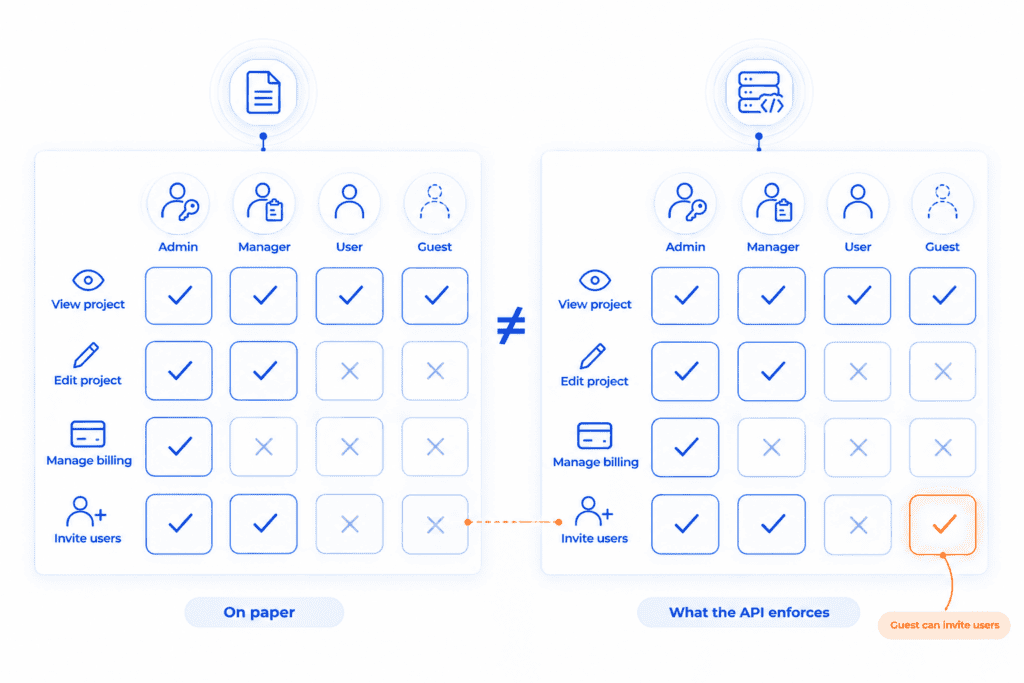
A role table like the one earlier only shows who exists. What needs enforcing is a full permission matrix: every role crossed with every feature the application exposes. A small slice of that matrix might look like this:
| Action | Admin | Manager | User | Guest |
|---|---|---|---|---|
| View project | Yes | Yes | Yes | Yes |
| Edit project | Yes | Yes | No | No |
| Manage billing | Yes | No | No | No |
| Invite users | Yes | Yes | No | No |
Take “Invite users” from that table. In the interface, only Admin and Manager ever see the invite option, so testing the UI alone proves nothing about whether that boundary holds. Send that same invite request from a Guest account, read-only by design, straight to the API. Nothing stops it if the endpoint isn’t independently checking the caller’s role, the request goes through, and a supposedly read-only account has now added a user to the system.
A table like this one (matrix above) rarely holds up on its own over time. A new feature ships, someone adds a check for Admin and Manager, and forgets Guest can still reach the same endpoint from an older client version. The matrix on paper and the matrix the API enforces drift apart, and nobody notices until someone goes looking specifically for the gap.
Testing a handful of roles against a handful of features doesn’t scale by hand. A real permission matrix for a mid-sized product can run to dozens of features across half a dozen roles, and every single cell is a claim that has to be checked against what the API does. The next section gets specific about how to check it all.
What a Real Frontend Pentest Looks Like
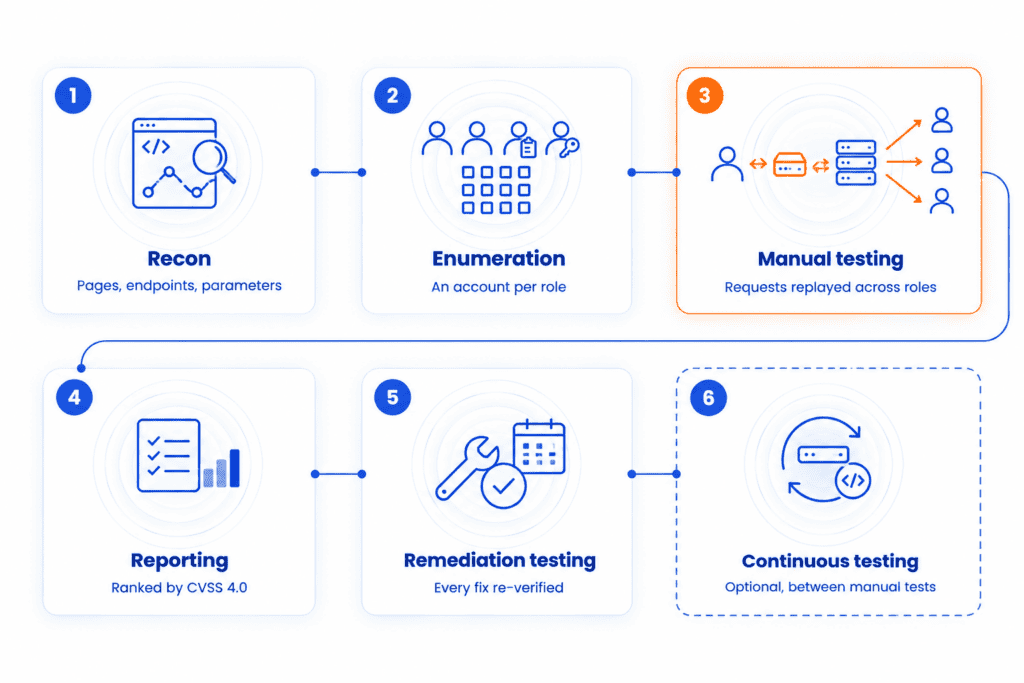
A frontend pentest follows a repeatable sequence, whether the app has four roles or forty. Here’s what each stage involves:
- Recon. Before touching any role logic, a tester maps the app. Every page. Every API endpoint. Every parameter, pulled from the JavaScript bundle, the network tab, and any exposed source maps. React and other SPAs ship most of this map in the bundle itself; client-side routing has to know every route the app can reach to work at all.
- Enumeration. This starts with an account for every role level, Guest, User, Manager, Admin, whatever more specific tiers the product has added on top, but it doesn’t stop at creating logins. A tester also maps out what each role is supposed to be able to do, which features, which endpoints, which actions, building the same kind of permission matrix covered earlier in this piece. Each account is a separate identity to test from, not a permission level to read about on paper, and that map is what every later step gets tested against.
- Manual testing, with tooling underneath. In the middle sits a proxy, Burp Suite or something similar, capturing every request between tester and application so it can be replayed and modified later. Custom scripts take over the repetitive part: the same request, run across dozens of role and ID combinations, exactly where IDOR and BOLA live. None of it runs unattended. A human decides what “should fail but didn’t” means for a given app.
- Reporting. Findings come back ranked by severity (CVSS 4.0), each with a plain-language executive summary, the exact methodology and scope that was covered, and specific remediation steps, not just a vulnerability name and a score.
- Remediation testing. Fixing a finding and confirming it’s actually fixed are two different steps. A remediation window, typically 90 days for compliance-driven engagements, gives testers a chance to re-verify each finding directly rather than take a developer’s word for it, alongside support to answer questions while the team works through the list.
- Continuous testing (optional). A one-time pentest is a snapshot. For teams shipping frequently, layering in a continuous scanning tool like Wraith Security between full manual engagements keeps automated coverage running in the gaps, CI/CD integration, cloud scanning, always-on monitoring, while the periodic manual retest still covers what scanners structurally can’t: the role-to-role testing this article is about.
If your own app’s role boundaries haven’t been tested this way before, CYBRI can walk through what that would look like for your setup.
Frameworks at a Glance
Every major frontend framework solves the same problem, rendering UI in the browser from JavaScript, but each one ships a different escape hatch where that default protection can be switched off.
| Framework | Released | Core approach | Main security footgun |
|---|---|---|---|
| React | 2013, Facebook | Component-based UI library, virtual DOM | dangerouslySetInnerHTML bypasses React’s default escaping entirely |
| Vue | 2014, Evan You | Progressive framework, template-based reactivity | v-html renders raw HTML the same way, no escaping applied |
| Angular | 2016, Google (rewrite of AngularJS from 2010) | Full framework, TypeScript-first, dependency injection | bypassSecurityTrustHtml() marks a value as trusted and exempts it from Angular’s built-in sanitizer |
| Svelte | 2016, Rich Harris | Compiler, no virtual DOM, ships less runtime code | {@html} renders raw HTML unescaped, and its naming doesn’t warn developers the way the others do |
Manual Pentest vs. Automated Scanning vs. Hybrid
Sweep a codebase for known-vulnerable dependencies. Flag obvious injection points. Run continuously with no human required. That’s the job automated scanners are built for. They do it well. What they consistently miss is whether the boundary between two roles holds up.
| What’s being checked | Automated scanner | Manual pentest | Hybrid |
|---|---|---|---|
| Known vulnerable dependencies | Strong, comprehensive, fast | Checked, but not the focus | Continuous scanning catches new CVEs immediately; the manual pass prioritizes which ones actually matter |
| SPA routes and client-side navigation | Partial at best, since routes exist only in JavaScript, not in crawlable HTML | Full coverage, mapped during recon from the bundle itself | Full coverage from the manual pass, with the scanner re-checking known routes continuously in between |
| IDOR and BOLA across roles | Can’t be detected without multiple authenticated sessions to compare, which most scanners don’t run | Core method: every finding described above comes from replaying requests across roles | Still requires the manual pass to find these; once found, the scanner watches for regressions on every deploy |
| Business logic, “should this succeed?” | No concept of intended behavior, only pattern matching | A human judgment call about what the app is supposed to allow | Unchanged, this stays a human call either way, the scanner doesn’t need to touch it |
| False positive rate | Higher: flags patterns without confirming real-world impact | Lower: each finding is manually confirmed exploitable | Lowest overall: scanner noise gets triaged and confirmed during the periodic manual pass instead of landing raw on your team |
| Speed and cost | Fast, inexpensive, can run continuously in CI/CD | Slower and more resource-intensive, run periodically | Continuous coverage at scanner cost, plus a periodic manual layer scoped only to what actually needs a human |
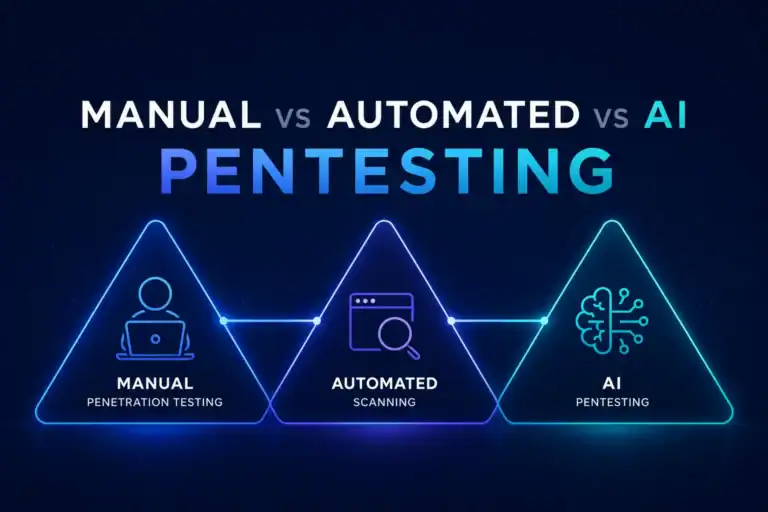
Scanning isn’t worthless, and a one-time manual test isn’t enough on its own either. A scanner running continuously catches regressions fast, at a cost manual testing can’t match. It answers a different question than the one this article is about.
A clean scan means no known CVEs or obvious injection points turned up. It says nothing about whether a Guest account can reach a Manager-only endpoint, that’s not something a scanner is built to ask. That gap is what separates a report with a logo from a pentest that tests roles against each other directly.
The strongest setup runs both together: continuous scanning catching what changes day to day, and a periodic manual pass covering what only a human tester can find, role-to-role access control and business logic chief among them. Neither one alone covers the gap the other leaves.
Here’s exactly what that testing covers, not just what a scan would show.
What to Expect During the Frontend Penetration Test
- A test account for every role in the app, not just Admin and User, each one used to call endpoints meant for other roles.
- Object IDs (user IDs, invoice numbers, project IDs) swapped between two accounts of the same role, checking for IDOR and BOLA.
- Admin-only or Manager-only endpoints called directly with a lower-privileged account’s token, independent of what the interface shows.
- The underlying API endpoint behind every button or menu item a given role can’t see in the UI, tested directly.
- JWTs verified against a pinned algorithm list instead of trusting whatever algorithm the token’s own header claims.
- Sessions and tokens confirmed invalidated on the server at logout, not just cleared from the browser.
- The production JavaScript bundle pulled and checked for exposed source maps, hardcoded API keys, or internal-only endpoint paths.
- Every use of React’s dangerouslySetInnerHTML (or the Vue or Angular equivalent) traced back to its source, confirming untrusted input gets sanitized before it renders.
- The permission matrix re-checked against the last few feature releases, since new endpoints are where it most often drifts out of date.
- A scan report treated as a supplement to role-based testing, never a replacement for it.
Frequently Asked Questions
What’s the difference between IDOR and BOLA?
Same underlying flaw, two different layers. IDOR stands for Insecure Direct Object Reference, the general web-application version: an app exposes a raw object reference, a user ID sitting in a URL, and skips the check on whether the requester actually owns it. Name that exact same flaw at the API layer and it turns into BOLA, Broken Object Level Authorization, sitting at number one on OWASP’s API Security Top 10 (API1:2023).
Do I need a frontend pentest if I already test my API?
Usually, yes, unless that API testing already covers this specific gap. Most API test suites confirm an endpoint works and returns the right data for one account, full stop. They don’t send the same request from a second, lower-privileged account to see whose data comes back. A frontend pentest exists to run exactly that comparison.
Can automated scanners catch broken access control?
Rarely. Comparing what two different roles can each reach would mean a scanner logging in twice and cross-referencing the results, and most scanners are built to run one authenticated session, not two side by side. That gap is a big part of why broken access control has held OWASP’s number one web risk spot across both the 2021 and 2025 editions. It slips past tooling built to spot injection flaws and known vulnerabilities. Checking authorization between roles is a different job, and most scanning tools were never built to do it.
How much does a frontend penetration test cost?
Scope drives most of the cost: role count, how many features each role touches, and whether the API gets tested alongside the frontend. A basic authenticated web application pentest starts at $5,000 and may go up to $30,000 depending on its complexity and URLs in scope, and apps with more roles or more environments to cover tend to sit near the top of it. Contact CYBRI for a scoped quote based on your app’s specific role count and feature surface.
Is React more vulnerable than Angular or Vue?
Not inherently. The vulnerability classes this article covers, IDOR, BOLA, privilege escalation, and interface-only access checks, are architecture problems. They show up regardless of framework, since they depend on how roles and API calls are enforced rather than which JavaScript library renders the page. The simpler explanation for React showing up more in pentest findings: it’s the most widely used framework right now, which means more of it exists to test. That’s a volume difference, not a security difference.
What’s the difference between a frontend security audit and a frontend penetration test?
Dependency scanning, CSP header checks, linting for obvious XSS patterns, that’s what a development team’s own audit of its code usually covers. It’s automated and inward-facing. A penetration test is adversarial: someone creates real accounts at different role levels and tries to make one account reach data or functions it shouldn’t.
Find Out Where Your Role Boundaries Stand
A clean scan says nothing about whether a Guest account can reach an Admin endpoint. A frontend penetration test checks every role against every other role’s data and functions, the way an attacker would. The test itself takes about one to three weeks depending on scope, and scoping can start before anything is signed.