Booking a penetration test for the first time raises the same questions: what gets tested, what to prepare, how long it takes, and how communication works along the way. This post walks through each one, from scoping and environments to timelines, communication, and delivery models.
What Gets Tested, and How Deep It Goes
Penetration tests come in three depths:
- Black box. Testers get no credentials and no internal knowledge, the same starting point as an outside attacker.
- Grey box. Testers get standard user access, sometimes across multiple roles, and work from there. This is the closest match to a real breach scenario, since most incidents start with a compromised account, not a blind external attacker.
- White box. Testers get full access and often source code or architecture documentation, useful for the deepest possible review.
When choosing a testing depth, authenticated testing, grey box or white box, beats a blind black box assessment for most cases. Both start from real access instead of guesswork, which is closer to how most actual breaches happen (a compromised account, not a lucky outside guess), and both scale well if you need multiple user roles tested (admin, standard user, guest, and so on) or want to extend the engagement into an internal network pentest. Grey box is the more common choice since it mirrors normal user access without handing over source code, while white box goes further for teams that want the deepest possible review. If your business has a specific reason to test blind, that’s easy to build into the scope. The starting point is a conversation about what you’re trying to accomplish with the test.
Staging, Production, or Hybrid?
When deciding where to test, staging is the default recommendation. It removes any risk of an in-progress test affecting a system your customers are using, and it gives testers room to try things they’d otherwise hold back on in production.
There’s room for flexibility. Plenty of clients don’t have a staging environment that mirrors production closely enough to be useful, and in that case, production can be tested directly instead. If you’d rather not commit to either extreme, a hybrid approach works well as a middle ground: testing happens on staging, and any findings get validated against production afterward, which keeps noise and disruption on the live environment to a minimum. It takes more coordination and more time, but it’s a reasonable compromise when staging alone isn’t an option.
| Staging | Production | Hybrid | |
|---|---|---|---|
| Risk to live systems | None | Some, testers work carefully | Minimal, testing itself stays on staging |
| How realistic | Depends on how closely it mirrors production | Most realistic, it’s the real environment | Findings get confirmed against production before you see them |
| Best for | Most clients, the default choice | No staging environment available | Wanting both safety and real-world confirmation |
Getting Ready Before Testing Starts
Once scope and rules of engagement are signed off, the main thing that determines how fast testing can start is access. For a typical grey box engagement, that means:
- Access to whichever environment you’re testing against, staging, production, or both for a hybrid setup
- Test accounts for each user role in scope
- Any IP allowlisting your firewall or WAF needs, so testing traffic isn’t blocked
- A technical point of contact who can answer questions quickly if testers hit something unexpected
Depending on what’s in scope, you may also need:
- API documentation, if APIs are in scope
- Cloud read-only access, if a security configuration review is in scope
The faster you can get this ready, the faster testing starts. The timeline begins the day there’s full access to everything in scope, not the day the contract is signed. The fuller checklist lives in the guide on preparing your team for a penetration test.
How Long It Takes
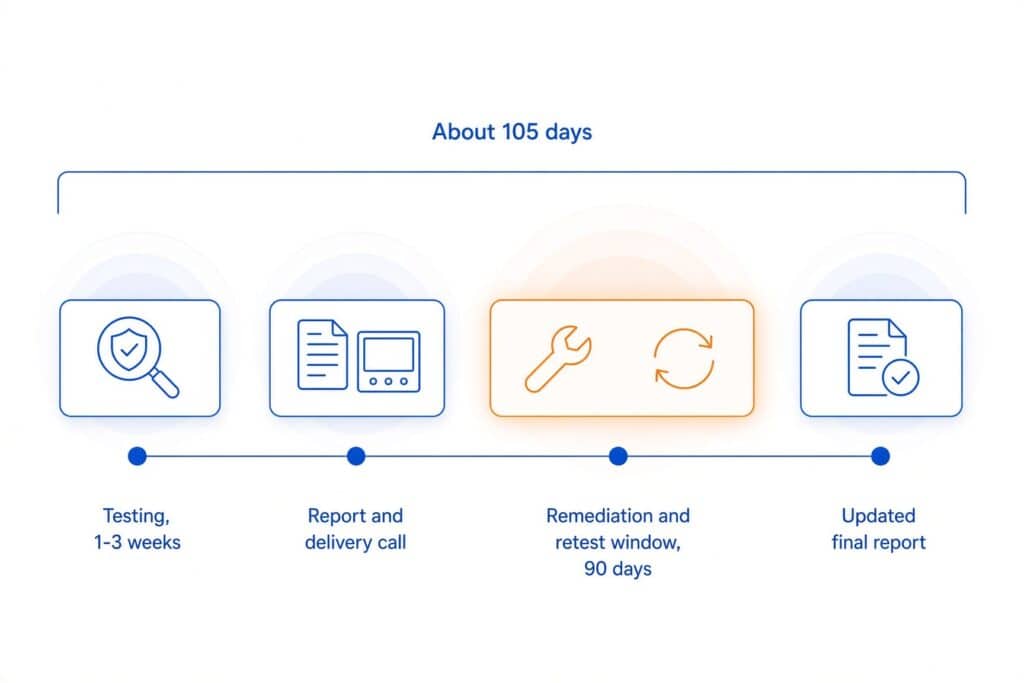
For most engagements, testing, reporting, and final delivery take 1-2 (one to two) weeks. Larger scopes, particularly large cloud environments with many services in play, can run three to four weeks. That’s the full cycle: testing, write-up, delivery video call with both teams discussing the findings, and a report in your hands.
After delivery, a remediation window opens. For engagements tied to a compliance requirement, that window is typically 90 days, and it includes several retests, not just one. It breaks down into two parts, both included in the same engagement:
- Remediation testing, where testers verify that specific findings have actually been fixed
- Remediation support, where testers are available to answer questions while your team works through the fixes
Once retesting wraps up, an updated report goes out reflecting the current state of your environment, so you have a clean, current document for your auditor, your customers, or your own records. Add it up and a typical one-off engagement takes about 105 days from start to finish: 1-3 (one to three) weeks of testing, plus a 90-day remediation and retest window.
How Communication Works During Testing
Most questions during a penetration test are about what’s happening right now and who to ask, not the findings themselves. That part stays simple: email, Slack, Signal, or, for continuous and PTaaS clients, CYBRI’s Blue Box platform, whatever works for your team.
If testers find something critical and actively exploitable, it doesn’t wait for the final report. Testers flag it to your point of contact the same day, over whichever channel you prefer, so your team can start fixing it right away instead of finding out it existed 2 (two) weeks later.
Comparing the Delivery Models
Four different delivery models exist: a one-off penetration test, continuous coverage (with a human retesting on a recurring schedule or automated scanning validated by a tester), and penetration testing as a service (PTaaS). Which one fits depends mostly on how often testing is needed and what’s driving it, ongoing coverage or a specific deadline.
| One-Off Penetration Test | Continuous Coverage | Penetration Testing as a Service (PTaaS) | |
|---|---|---|---|
| Best for | A single compliance deadline, customer requirement, or first-time engagement | Ongoing coverage, either a human retesting on a schedule or automated scanning with manual validation | Locking in a year of testing upfront and drawing it down as needed |
| Cadence & reports | One manual test, one report, updated after each retest | With human touch: recurring manual test plus continuous scanning. Without: monthly automated scan, tester-validated. | A set number of prepaid manual tests scheduled across the year, one report per test |
| Typical length | ~3.5 months average: 1 to 3 weeks testing,* plus a 90+ day remediation and retest window | With human touch: ~3.5 months average per manual cycle, including time to remediate before the retest window opens. Without: ongoing monthly cycle, no separate retest window | Varies with how many tests you purchase and when you schedule them; each test carries its own 90+ day window |
| Blue Box platform | Not included | Included | Included |
*Engagement duration covers testing, reporting, and final delivery. It starts once every in-scope asset is accessible, not when the contract gets signed.
Communication doesn’t change by delivery model: email, Slack, or Signal all work the same way across every option.
Important: every CYBRI report lines up with whatever compliance framework you need it for, HIPAA, PCI DSS, SOC 2, ISO 27001, and SEC included.
When comparing quotes, three things drive the price: how many applications, APIs, or cloud environments are in scope, how many separate environments (staging, production, or both) you want covered, and how many user roles need their own pass. A single web app with one or two roles sits at the low end. A combined web, API, cloud, and AI assessment with multiple roles is the more typical mid-range project. Multiple applications and cloud accounts together push it toward the top of the range.
What’s Included in Every Engagement
Regardless of which delivery model you choose, every CYBRI report includes:
- An executive summary for auditors, clients, and board members
- A technical findings section with a severity score on every finding (CVSS 4.0), so your team knows what’s urgent without needing security expertise to interpret it, plus specific remediation steps
- A methodology and scope section stating exactly how the test was run and what was and wasn’t covered
- Tester biographies and OSCP certifications, so you know who did the work
- Manual-first penetration testing done by experienced pentesters
- Authenticated (grey or white box) web application testing as the default approach
- Senior, OSCP-certified testers on every engagement
Reports typically run 30 to 100 pages depending on scope, with findings ordered by severity so your team knows where to start. For continuous and PTaaS delivery models, reporting and communication are also available via CYBRI’s Blue Box platform.
Frequently Asked Questions
Does testing require production access?
Staging is the default recommendation. Production or a hybrid split works too, if staging isn’t a realistic option for your setup.
How many user roles can you test in one engagement?
As many as your application has. Multi-role testing (admin, standard user, guest, and anything in between) is a standard part of authenticated scoping, not an extra.
What if new issues come up during the remediation window?
That’s what remediation support is for. Testers stay available to answer questions while your team is fixing findings, before you request the retest.
How will you keep us updated once testing starts?
Whatever channel’s already in use works, email, Slack, or Signal. On a continuous or multi-test plan, Blue Box adds a live view on top.
Do we need a signed contract before you’ll discuss scope in detail?
No. Scope, environment, and rough timing can be discussed before anything is signed. The clock only starts once there’s full access to what’s in scope.
If you’re not sure which delivery model fits your situation, the fastest way to find out is a short scoping conversation, not a long sales process. Check current pricing for a sense of range, and the rest gets worked out from there.